
Following an incident as it happens matters, especially for AI investigations. That visibility is what lets you understand what the agent is doing and why. What did it just do? What log query did it run? What did it choose, and what did it rule out? Following the train of thought matters as much as seeing the end result. You build confidence in the model’s reasoning by watching it work, and when you want to jump in, you’ve got the full trail to choose a starting point.
That visibility gets hard to hold onto across a network switch, or a laptop that’s been closed for an hour while the investigation keeps running underneath. Low-latency streaming and durability across disconnects can pull against each other. Streaming wants to be fast and “fire-and-forget”, while durability wants everything persisted and ordered. In this post, we’ll cover how we built a system that does both for our AI Teammates, so users can track their actions and stay confident by watching what they’re doing in real time.
The one-laptop version
It seems simple enough: open a WebSocket, forward tokens as they arrive, render them as they land. But the moment a single frame drops, the entire stream starts to break down. The message gets corrupted, alternate browser tabs now show completely different states, and an attempted reconnect either replays the whole message from scratch or loses it outright. This makes it impossible for a team to actually follow what’s happening in an investigation.
The design
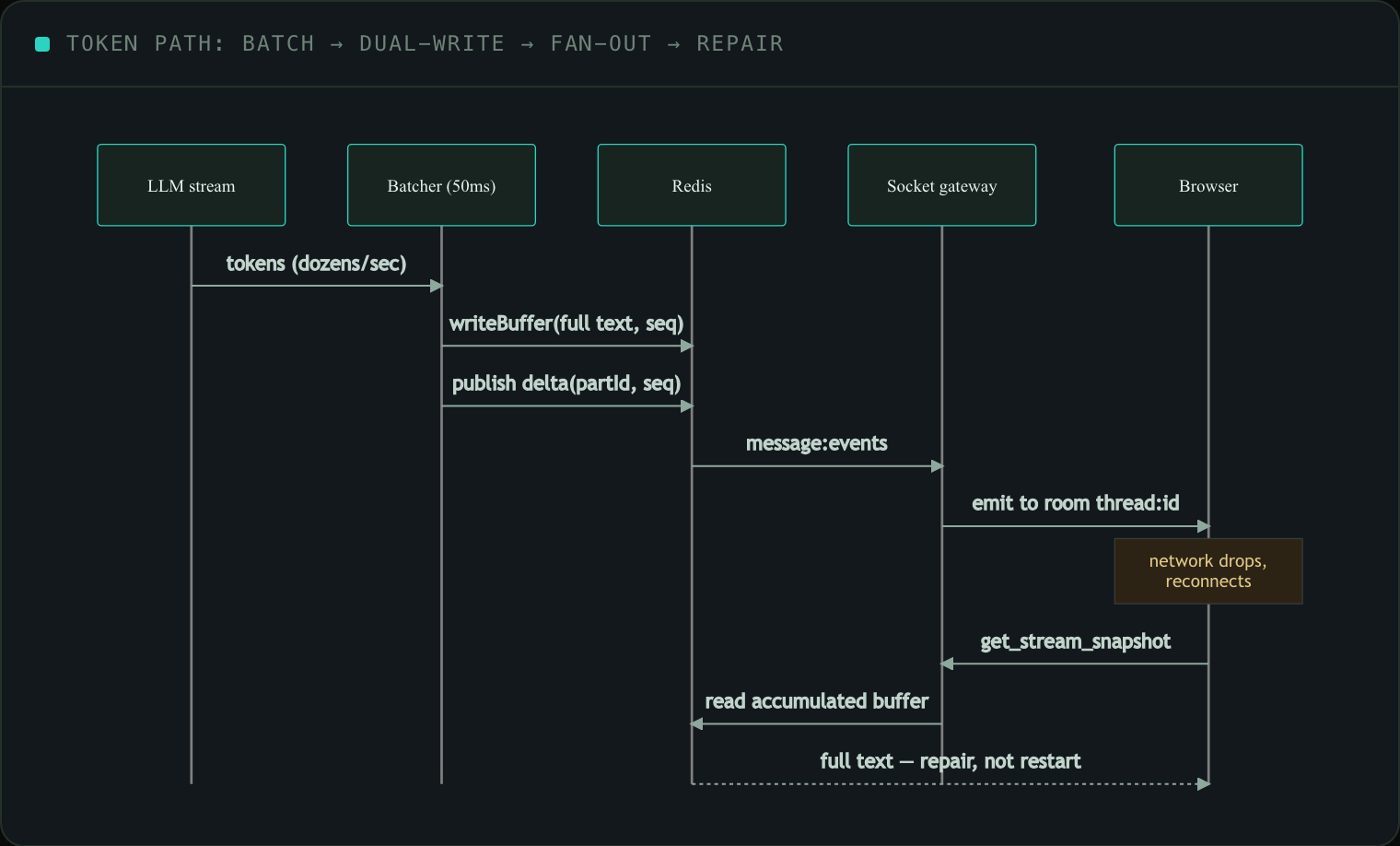
Tokens are coalesced by a batcher that flushes on a 50 ms timer, so the socket sees at most ~20 emits/second no matter how fast the model talks. Every flush carries a monotonically increasing seq and a partId that changes at each new model completion, and the async publishes are threaded through a single serialized promise chain, publishChain = publishChain.then(next), so deltas can never reorder under concurrency. Critically, each flush does a dual write: the incremental delta goes to a Redis pub/sub channel (the live path), and the full accumulated text goes to a short-TTL Redis buffer keyed msg-stream:<id>, TTL 300s (the replay source).
On the client, deltas run through an idempotent, monotonic reducer that sits outside React Query entirely (via useSyncExternalStore), so token updates never invalidate or re-fetch anything:
// applyDelta, the client is allowed to drop or de-dup, never corrupt
if (partId !== cur.partId || seq === 1) reset(cur)  // new stream
if (seq <= cur.seq) return                          // stale / duplicate → ignore
cur.text += delta; cur.seq = seq
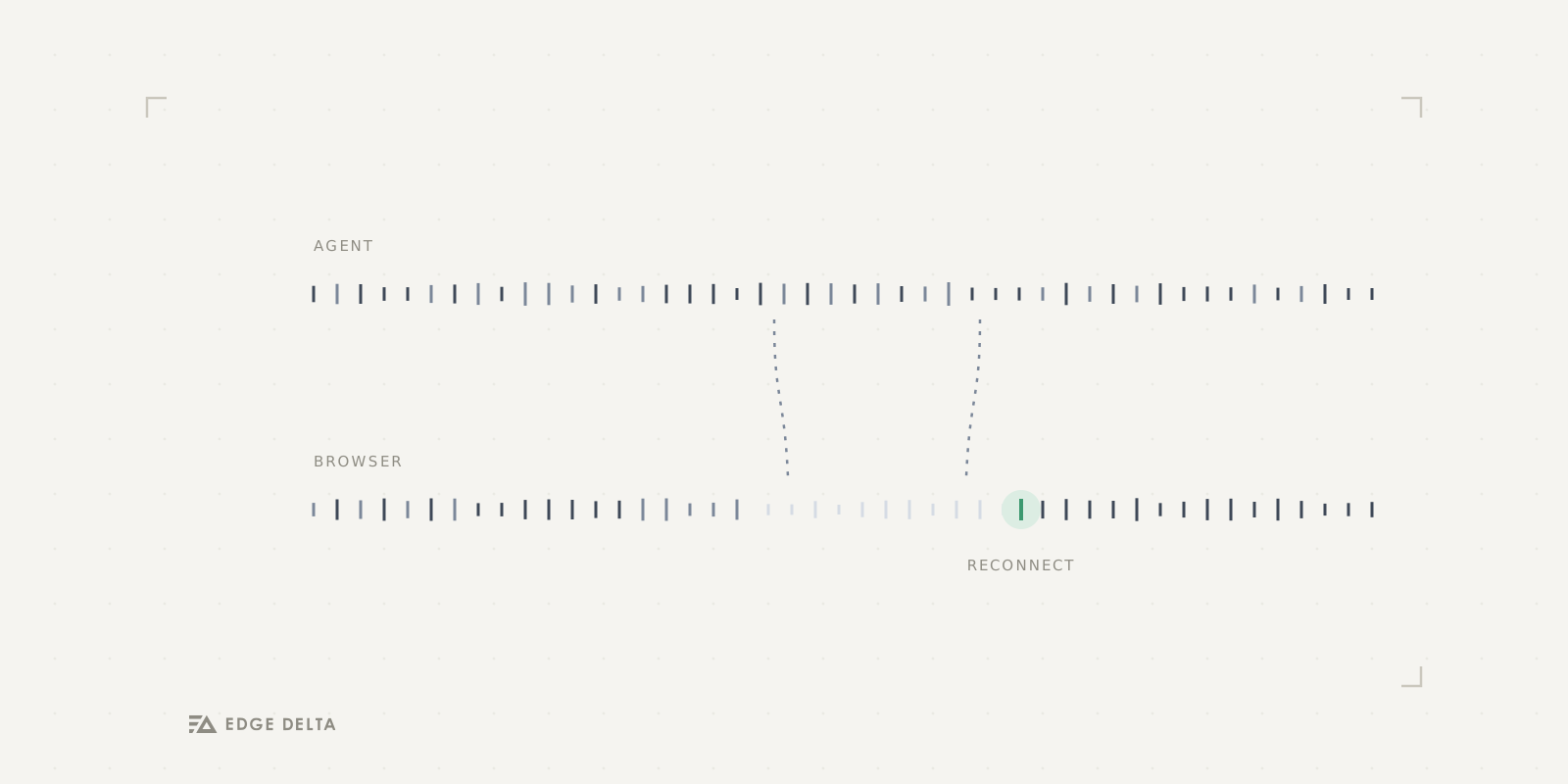
On reconnect, the client re-subscribes to the thread room, pulls the accumulated snapshot with get_stream_snapshot, and reconciles against what it already has. Reconnection becomes a repair, not a restart. That works only because the agent is a durable workflow that never stopped running server-side (see post 3). The timeline of the investigation is replayed the same way, from a separate Redis list capped at the last 200 events.
Two Redis primitives, on purpose
The live token path is drop-tolerant pub/sub, fanned out across pods by a Socket.IO Redis adapter so an event produced on the pod running the agent reaches a socket held by any other pod, routed into rooms (thread:<id>, org:<id>, user:<id>). But the agent’s work queue (the tasks that must not be lost) runs on Redis Streams consumer groups with dedicated reclaim workers that pick up messages abandoned by a crashed consumer. Same datastore, opposite guarantees: at-most-once and cheap for the UI, at-least-once and durable for the work. Picking the wrong one for either job is a subtle, production-only failure.
The bug that taught us the pattern
The AI Overview feed lets you approve or decline an action inline. We shipped it, and watched approved actions flicker back into buttons a second later. The activity cache stored threads unbound, without the expensive per-request connector state, because binding costs three repository loads. A thread_updated socket event then merged an unbound thread over the bound one and erased the state the user had just set. The fix was to bind execution state late. On every socket merge we re-derive each action’s state from the merged data (a reattachThreadActionExecutionState step), so the cheap cached object stays cheap and the UI never regresses. You only find that class of bug by watching a real user’s click undo itself.
Build-it-yourself reality check
Streaming the tokens themselves isn’t the hard part. What’s tricky is ensuring consistency with the infrastructure around it: ordering guarantees when you’ve got concurrent publishes, making sure someone who joins mid-stream sees the correct state, fanning out across multiple tabs and multiple pods without them drifting apart, and figuring out reconnects that pick up where you left off instead of starting over. Each one of those is its own unique problem, all of which need a solution before any AI investigation is ready to be used on modern production environments.
That’s the problem we solved. The server always knows the real state of the investigation, while your browser holds a copy of it. Instead of letting that copy quietly fall out of sync, we built the reconnect logic to check itself against the server and repair anything that drifted, so when your laptop reconnects mid-incident, you can trust that what you’re seeing is ground truth.
See it for yourself in our AI Teammate investigations. Visit edgedelta.com to try them for free.