
Something predictable happens when we put an AI teammate in front of a platform team. The first fifteen minutes go really well. It walks the dependency chain of a failing service, finds the deploy that went out three hours ago, and explains the root cause while everyone is still reading the alert. Then somebody asks what happens when it wants to fix the thing, and the room gets noticeably quieter.
We’ve had some version of this conversation with almost every team that evaluated us this year, and honestly it’s the right reaction. Giving production access to a system that writes its own plan is a big decision, and “trust us, it’s good now” isn’t an answer anybody should accept. There are really two worries packed in there. One is about what our agents send to a model while they’re investigating. The other is about what they’re allowed to do once they’ve worked out the answer. Both are fair, and we’ve spent this year building for both.
In this post, we’ll walk through how Guardrails handles them, starting with the second one, because that’s the worry that actually stops rollouts.
Our agents got much better at investigating
That first fifteen minutes isn’t a demo trick. Earlier this year we shipped a knowledge graph that maps your environment the moment you connect a source: services, the repos they’re built from, the teams who own them, their dependencies, the runbooks that describe them, and what a given failure would touch. We wrote up how it works and why we built it a few weeks back, and it’s worth reading if you want the detail. Since then we’ve made consulting that map a required step in every investigation rather than a tool the model might remember to call, and it’s the biggest jump in root-cause quality we’ve had.
Here’s the part that matters for this post: every move an agent makes on that graph is a read. Topology, dependencies, blast radius, criticality. None of it writes anything anywhere. So the part of the product that makes people lean forward is available before you’ve granted a single permission, which is convenient for us, and it’s also why the ladder below starts where it does.
The trust ladder
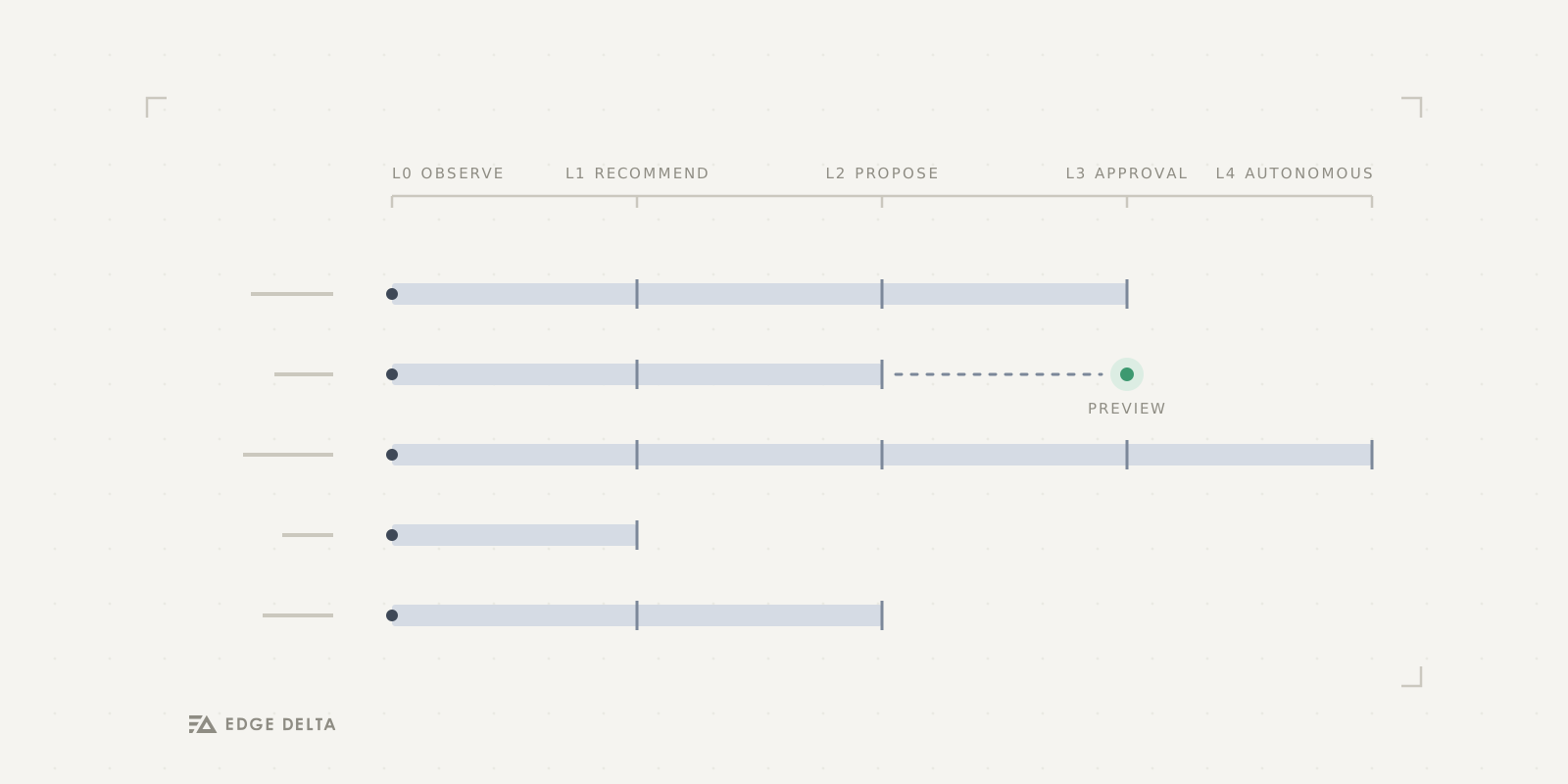
Guardrails turns “can the agent act?” into a dial with five positions, and your account sits on one of them at a time.
At L0 Observe your agents read and do nothing else. At L1 Recommend they’ll comment on issues, PRs, monitors, and configs, but a human still makes every change. At L2 Propose they draft the change itself, a PR, a monitor, a dashboard, and it sits there unapplied until somebody accepts it. At L3 Act with approval they execute, but every action waits in an approval queue first. At L4 Autonomous they run the loop and tell you afterwards.
New accounts start at L2, and I’d argue that’s the most consequential decision in the whole feature. On day one your agents produce real artifacts and apply exactly none of them. You don’t have to make a security call before you’ve watched the product work, and nobody on your team wakes up to a change they didn’t ask for.
That’s the point of a ladder. “Do you trust the AI?” is an impossible question to answer in a procurement meeting, while “has it drafted good PRs for two months?” is one you can answer with evidence you already have. You climb when the evidence says so. And if something feels wrong, an admin can drop the whole account back to L0 in a single click.
You’ll want to think in domains, not connectors
Our first instinct was to let you set all this per connector, and customers talked us out of it fairly quickly. Nobody actually thinks that way. You don’t sit down and decide how much you trust an agent inside CircleCI. You decide how much you trust it with deployments and rollbacks, and then you go find out which tools that covers. Per-connector permissions ask you to hold our model of your infrastructure in your head instead of your own.
So Guardrails sorts every tool from every connector into six domains: Code & PRs, Deployments & Infrastructure, Pipelines & Data, Monitors & Incidents, Collaboration, and Agents & Models. Each one carries its own level.
Which finally gives you the sentence you wanted to say all along. Let it act on monitors and incidents at L3, where every change waits for a human. Keep deployments at L0, where it only looks. And because a tool inherits the level of its domain rather than the connector it arrived through, adding a new CI system next quarter doesn’t reopen a decision you already made.
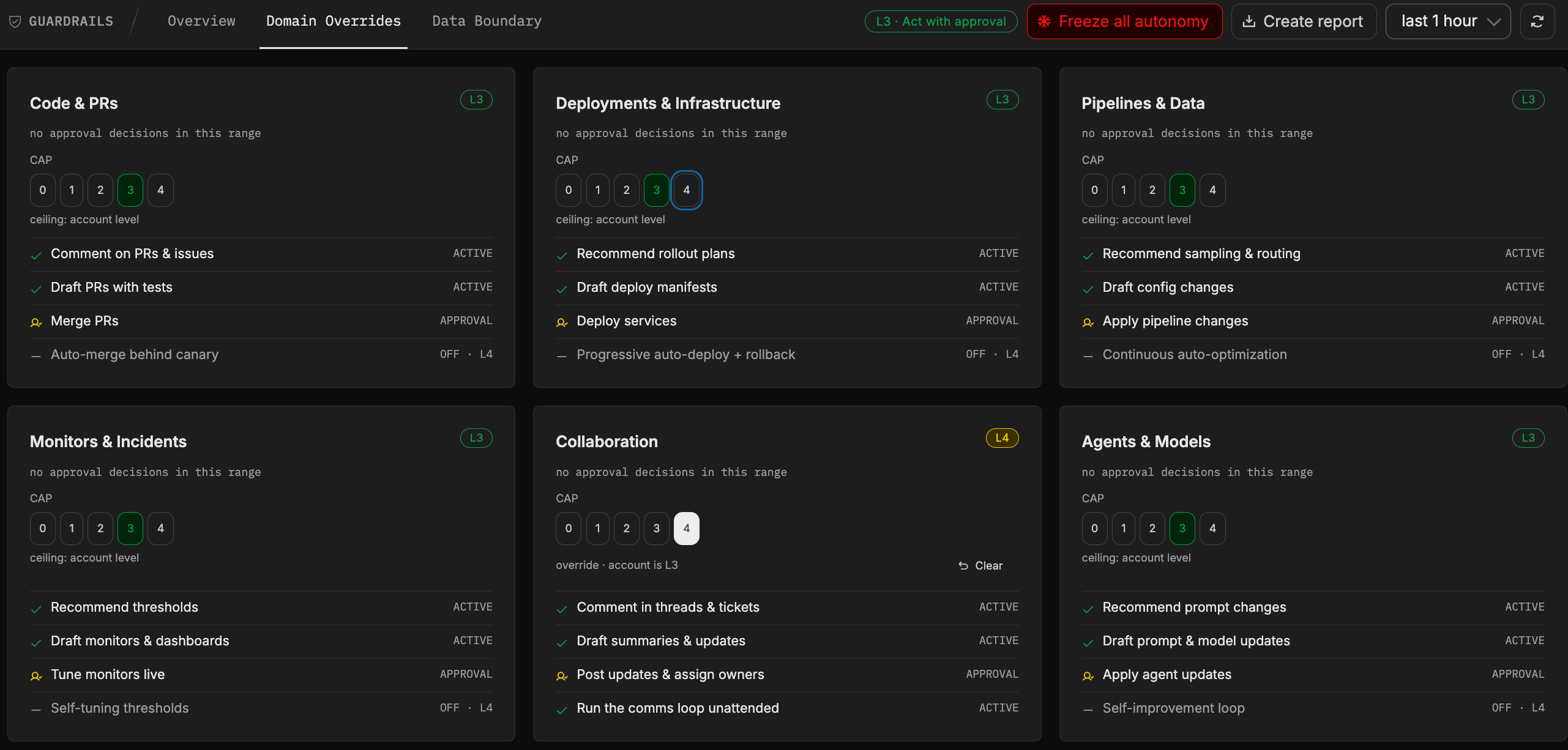
Six domains, six answers. Collaboration is running a rung above the account here, and every card spells out what that actually permits.
See what a level change does before it does it
The scariest moment in any permission system is the moment you change it, because you’re guessing at what you just switched on. So in Guardrails, clicking a level doesn’t change anything yet. It opens a preview first: what the change is, how far it reaches, when it takes effect, how to reverse it, and a domain-by-domain list of the exact capabilities that move. Domains that aren’t affected say so. If you pick a level a domain is already running at, it tells you that instead of quietly doing nothing. The same preview runs when you move a single domain rather than the whole account.
It’s a small feature and I think it matters more than it looks. Without it, every level is a leap you take first and understand afterwards.
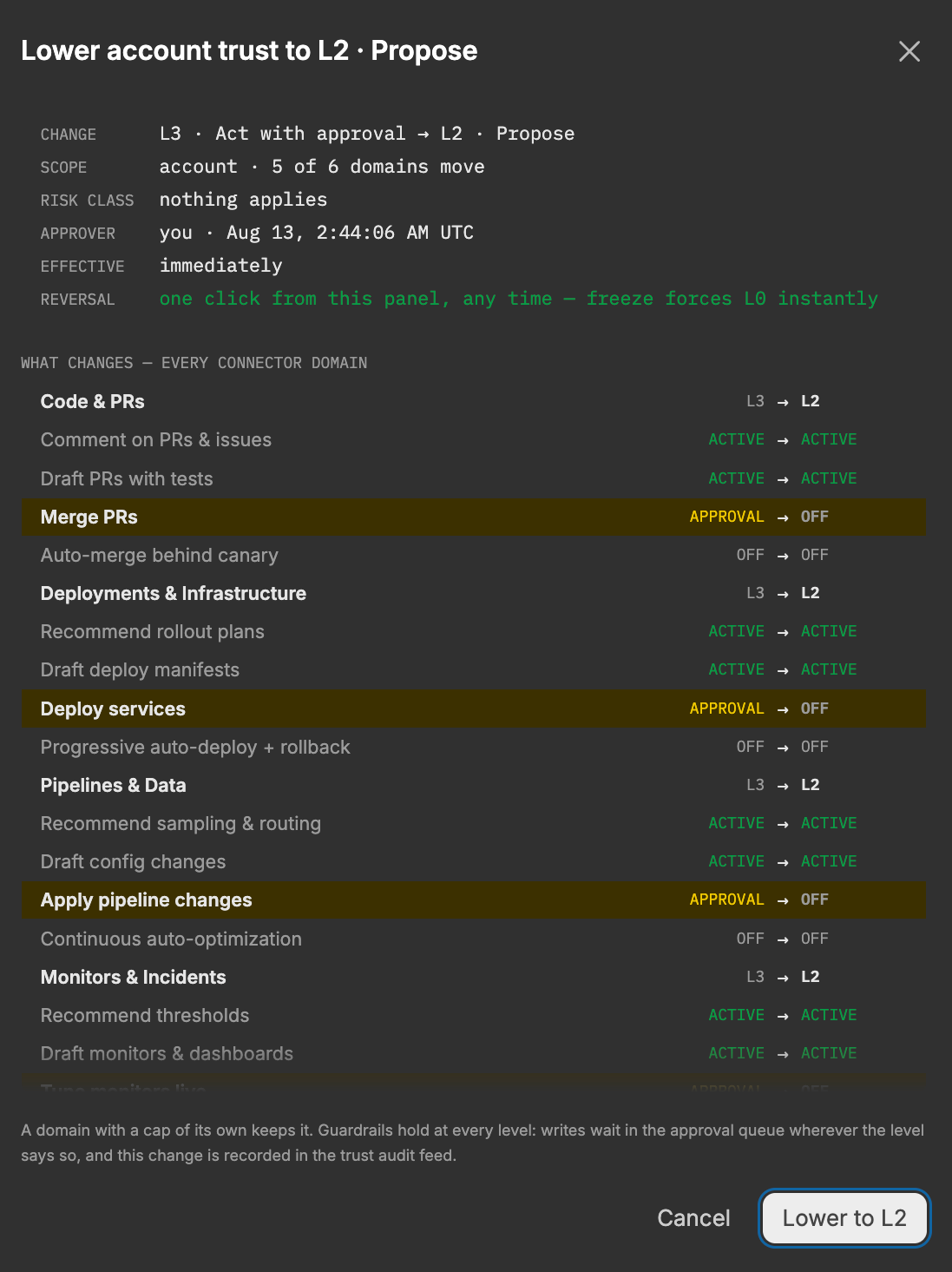
Nothing has changed yet. Five of six domains move here, the sixth holds because it has a level of its own, and every capability that changes is named before you commit.
What actually leaves your environment
Everything so far is about what agents do. The other worry is about what they send, and it deserves a straight answer, because letting an agent read your telemetry does mean your telemetry reaches a model.
Telemetry is also exactly where credentials end up. A stack trace carrying a database connection string. A config dump with a live key in it. An auth header somebody logged during an incident two years ago and never went back to clean up. Nobody puts these there deliberately, which is why asking people to keep them out has never worked.
So Guardrails redacts on the way out, before the model sees anything: private keys and certificates, JSON web tokens, AWS access keys and session tokens, bearer tokens and basic auth credentials, database connection passwords, credit card numbers. A matched secret is replaced with a placeholder, so the agent can still reason about the message without ever seeing the value. The Data Boundary tab counts what it actually caught in your account, category by category, so you can check the claim rather than take our word for it.
Worth noting that this runs at every level, L0 included. Read-only is the safest rung on the ladder, but it isn’t a rung where nothing is happening.
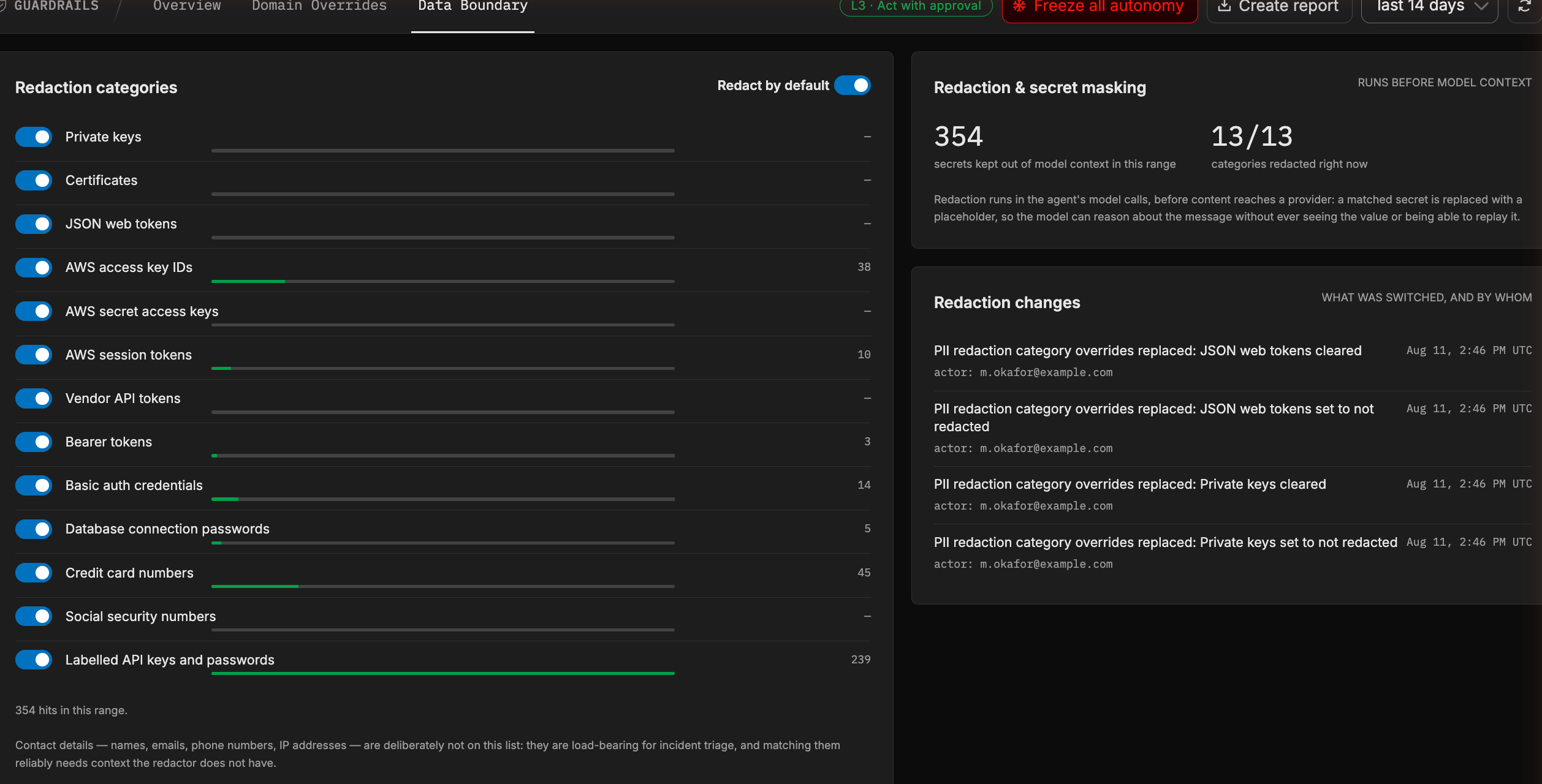
Every category, with what it actually caught. The numbers are yours, not ours. Contact details are deliberately left off the list, because names and IP addresses are load-bearing during triage.
One screen, and a report you can hand over
I want to be straight about the before. None of these controls were invented this week. Per-tool execution levels lived in connector settings, per-teammate overrides lived in teammate settings, the approval queue sat on an overview page. All of it worked. But none of it could answer the question every security reviewer opens with, which is just: what can your agents do in our environment?
Settings spread across six pages aren’t really settings anyone can audit, so this release removes about as much as it adds. Approval levels are read-only now where you used to edit them, the queue has moved onto the Guardrails page, and one screen owns the answer. That screen also exports it, as a signed report in JSON or PDF covering the resolved settings across your account, your domains, and every tool underneath them, plus the masking filters running in your pipelines. Send that to your security team before the pilot instead of assembling it by hand after they ask.
Wrapping up
An agent that can look at your production systems is genuinely useful on its own. An agent that can change them is a much bigger decision, and most of the tooling out there asks you to make that decision once, up front, as a yes or a no. That has never felt right to us. Trust isn’t something you grant in a checkbox, it’s something a system earns in front of you.
Guardrails is our attempt at doing it that way. Raise the level when the evidence says you should, one domain at a time, with a preview before every move and a record after it. Accounts land on L2 by default, drafting away and applying nothing, which is where we think a new agent belongs. If you’d rather watch before anything gets drafted at all, you can start read-only at L0 and climb from there.
We’re not finished with this. Right now you’re the one deciding when to climb, and we’d like Guardrails to make the case for you instead. It’s already recording every approval, rejection, override, and level change per domain, so having it come back and say “monitors have earned L3, deployments clearly haven’t” is the obvious next thing to build. Further out, we want to separate environments properly, so your staging account can run a couple of rungs ahead of production while you get comfortable.
Set your own level
Already on Edge Delta? Open Guardrails in the left nav under AI. You’ll find your account sitting at L2, and every domain underneath it waiting for you to decide.
New to Edge Delta? Sign up, connect a source, and let your agents map the place while you decide how far up the ladder they get to climb.