
Edge Delta’s AI Teammates are at the forefront of Observability 3.0, running agentic workflows on real-time production data from tools like Kubernetes, GitHub, AWS, PagerDuty, and Jira to autonomously triage, investigate, and remediate issues in real time.
But non-deterministic investigation is only part of automated incident response. Teams still need a way to reliably execute the appropriate operational steps: running a specific query, paging the on-call engineer, creating an incident channel, or opening a ticket with the right context.
That’s why we’re thrilled to introduce Edge Delta Workflows, a deterministic orchestration layer that connects AI Teammate investigations to guaranteed, auditable, repeatable actions across your tools. By combining flexible AI-driven analysis with a structured execution framework, Workflows allow teams to operationalize what Teammates discover and ensure the right actions happen every time.
In this post, we’ll discuss the benefits of this unified approach, demonstrate how to build Workflows in Edge Delta, and explore real-world scenarios where AI Teammates and Workflows join forces to streamline operations.
Closing the Gap Between Understanding and Action
Your AI Teammate just figured out that a latency spike in the checkout service correlates with a deployment merged 20 minutes ago. Error rates are up 12x. Users are affected.
Now what?
You need the on-call engineer paged. You need a Slack channel created for the incident. You need a Jira ticket filled with the right severity and the right fields. You need the deployment author notified.
You could prompt your Teammate to do these things. You could add instructions like “always page the on-call when severity is critical.” And sometimes it will.
But agentic flows are non-deterministic by design. AI Teammates are extremely capable of reasoning through ambiguous signals, weighing evidence, and adapting their analysis as new information appears. This flexibility is what makes them good at diagnosing complex issues.
Operational actions, however, need to happen the same way every time. Teams need to know that a PagerDuty incident will always be created with the correct urgency, that a Slack message will always be sent on a critical alert, and that workflows can branch on severity using repeatable logic that can be verified and audited.
Investigation benefits from flexibility, but actions should be deterministic.
That’s the problem Workflows solve.
What Are Workflows?
Edge Delta Workflows are a graphical, node-based orchestration layer that connects AI Teammates’ non-deterministic investigation capabilities to deterministic operational actions.
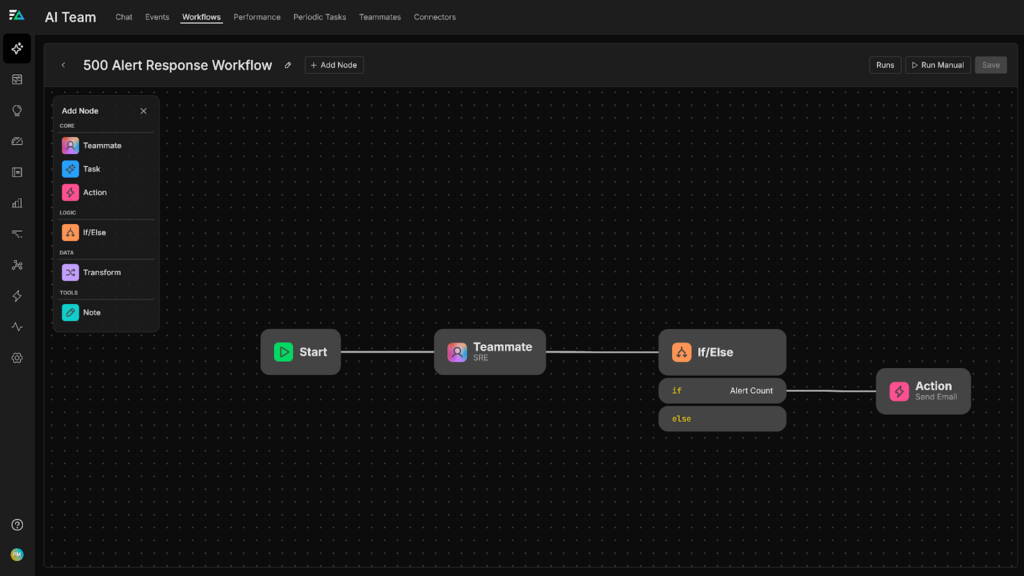
Each Workflow is comprised of a combination of distinct node types that serve unique functions:
Trigger Nodes
The trigger node is the entry point into a Workflow, and it supports four distinct trigger types:
- Monitor events: Any Edge Delta monitor (metric threshold, pattern anomaly, synthetic check, log threshold, composite) can trigger a Workflow when it fires.
- Connector events: GitHub pull requests, PagerDuty incidents, CircleCI build completions, and 60+ other event types from your connected integrations.
- Scheduled runs: Cron-based periodic execution with timezone support. Run a health check Workflow every morning, or a compliance scan every Friday.
- Manual execution: Trigger a Workflow on demand when you need it.
AI Teammate Nodes
The AI Teammate node prompts a Teammate of your choice to run a full investigation using the tools it has access to, such as GitHub, Jira, PagerDuty, and Edge Delta’s MCP Server. Instead of responding with freeform text, the Teammate returns a JSON-schema-validated response that downstream nodes can parse, evaluate, and branch on for future logic.
If/Else Nodes
If/else nodes are simple JavaScript statements evaluated against structured data from upstream nodes that allow teams to build conditionality into their Workflows. For example, the following statement allows the Workflow to route differently based on the values of `data.severity` and `data.confidence`:
data.severity === “critical” && data.confidence > 0.8
Transform Nodes
Transform nodes reshape data between steps. For example, this node type can aggregate findings, extract fields, and format payloads. Each transform runs sandboxed JavaScript with access to the current data, previous node results, and Workflow state.
Action Nodes
Action nodes are where deterministic execution happens. At launch, our Workflows support 21 specific operations across five platforms:
Slack (11 actions): Send messages to channels, create new channels, invite users, set channel topics and descriptions, list channels and members, archive channels.
Jira (4 actions): Create issues with specific project, type, assignee, and priority. Add comments to existing issues. Transition issue statuses. Retrieve issue details.
PagerDuty (3 actions): List services, get the current on-call user for a schedule, create incidents with defined urgency and type.
Microsoft Teams (3 actions): Find users, send messages to team channels with mentions, reply to existing message threads.
Email: Send emails with recipients, CC, BCC, and templated content.
Every action node supports configurable retry logic, with intervals up to 60 seconds and up to five retry attempts.
Building Workflows in Edge Delta
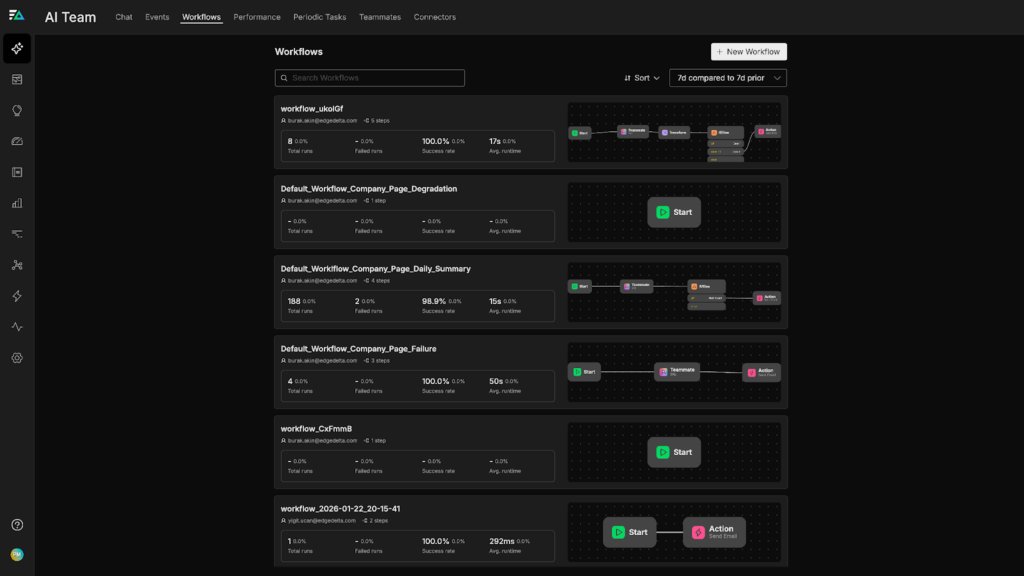
Edge Delta makes building Workflows intuitive. First, navigate to the Workflows tab in your AI Teammates account and click the “New Workflow button”:
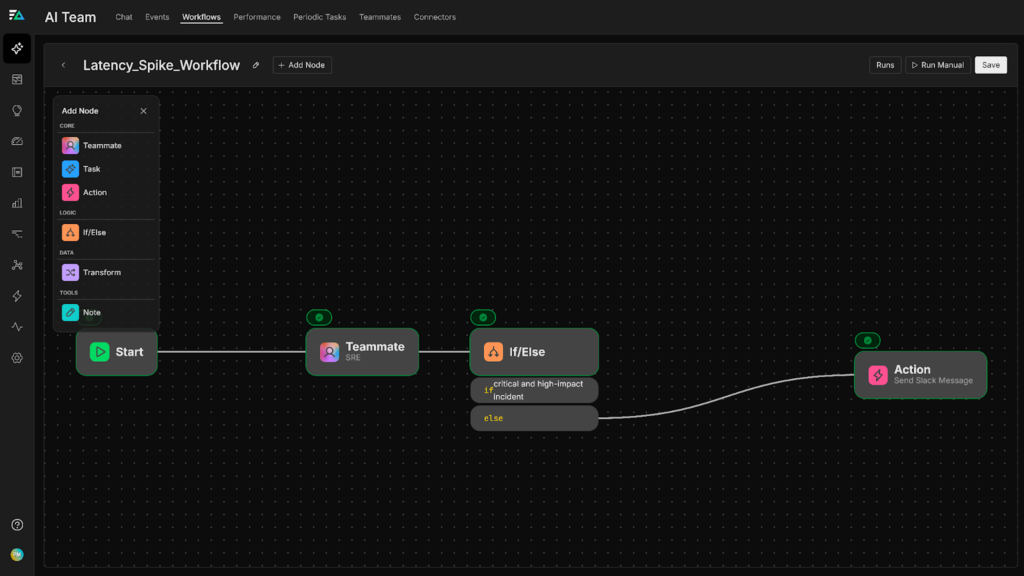
From there, you can drag nodes onto the canvas, configure their parameters, connect them, and define when and how they run, including schedules and conditional branching:
For more detailed information on workflows, be sure to check out our official documentation.
The Structured Output Bridge
When an AI Teammate node runs inside a Workflow, you define a JSON schema for its output. The Teammate investigates freely, querying logs, checking metrics, reviewing deployments, but its final response is validated against that schema. In practice, it might look something like what’s shown below, where a Teammate investigates a latency spike and returns the following JSON:
{
  "severity": "critical",
  "affected_service": "checkout-api",
  "estimated_user_impact": "high",
  "error_rate_change": "12x baseline",
  "correlated_deployment": "deploy-a1b2c3",
  "root_cause_hypothesis": "Memory leak in connection pooling after v2.4.1 merge",
  "confidence": 0.91
}
The next node then checks whether data.severity === “critical” && data.estimated_user_impact === “high”:
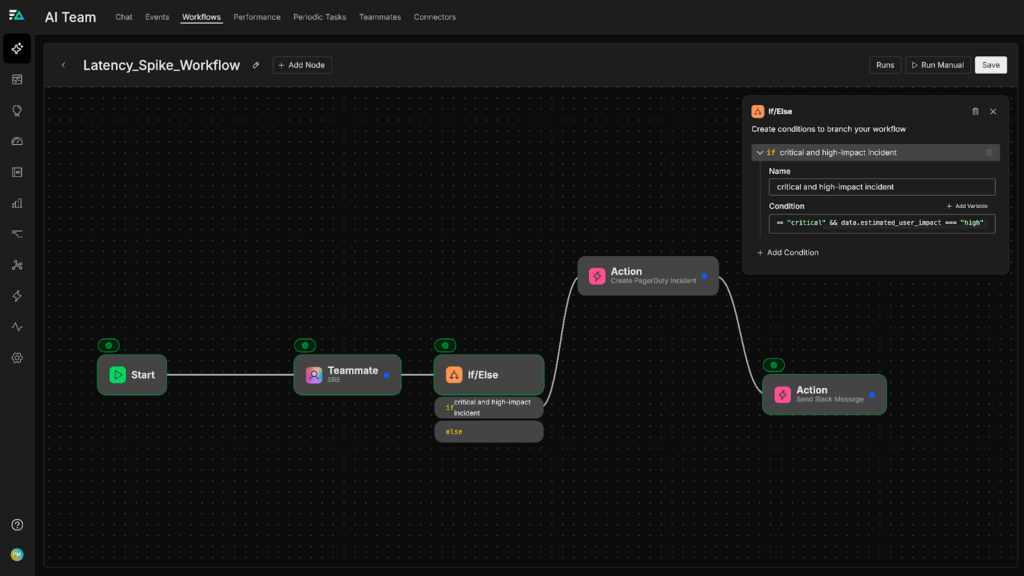
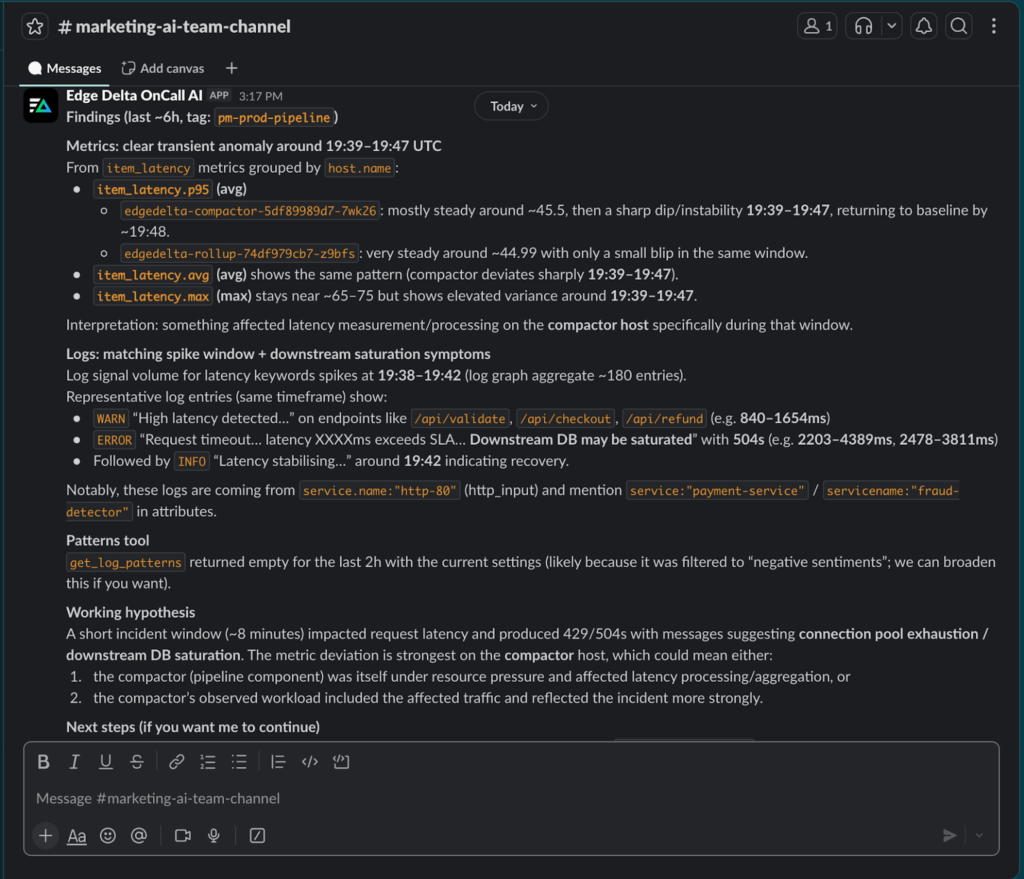
The structured JSON output enables downstream agents and nodes to query the data, evaluate conditions, and trigger the appropriate actions. In this case, if the severity is critical and estimated user impact is high, the following action node creates a PagerDuty incident using those structured fields. The Slack message includes the root cause hypothesis and the correlated deployment, and the corresponding Jira ticket references the affected service and the deployment hash:
Real Examples
Workflows support a wide range of real-world operational scenarios. In this section, we’ll go over a few examples of how teams are using them to maximize the value of their AI Teammates.
Monitor-Triggered Incident Automation
A synthetic monitor detects your checkout API returning 503s, triggering the associated Workflow:
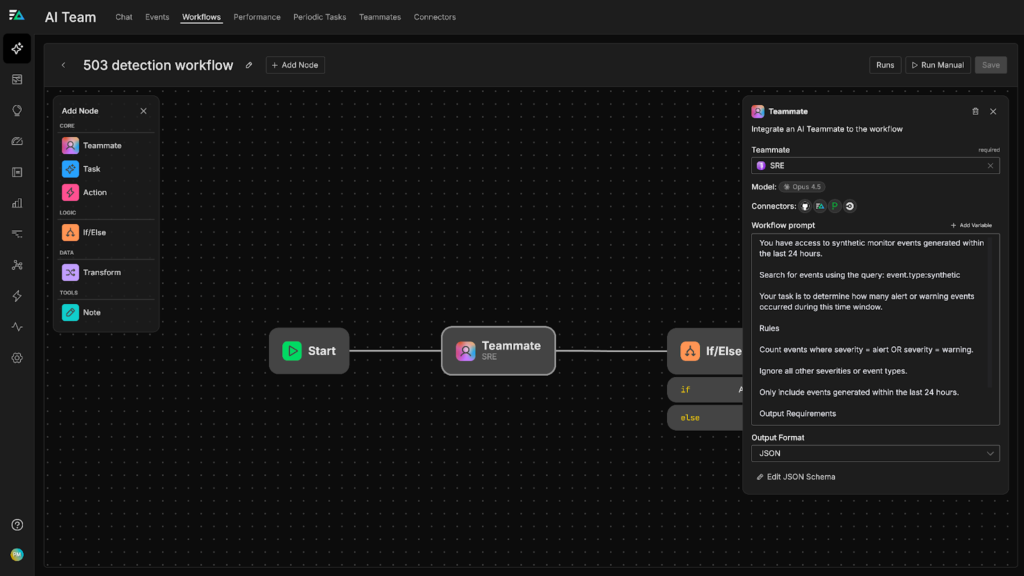
An AI Teammate node kicks off an investigation, searching application logs around the failure window, querying error rate and latency metrics, checking GitHub for recent merges to the checkout service, and reviewing PagerDuty for related open incidents. It then returns a structured output containing severity, affected service, user impact assessment, correlated deployment, and confidence score.
From there, an if/else node evaluates severity and confidence to determine the path forward. On the critical path, a PagerDuty incident is created with full structured context, a dedicated Slack channel (#inc-checkout-031) is spun up, the on-call engineer and service owner are invited, and an investigation summary is posted. On the low-severity path, a Jira ticket is created in the backlog with the Teammate’s findings, a summary is posted to the team Slack channel, and no page is sent.
Deployment Verification via GitHub Events
A GitHub deployment event fires when a service is pushed to production, triggering the Workflow shown below:
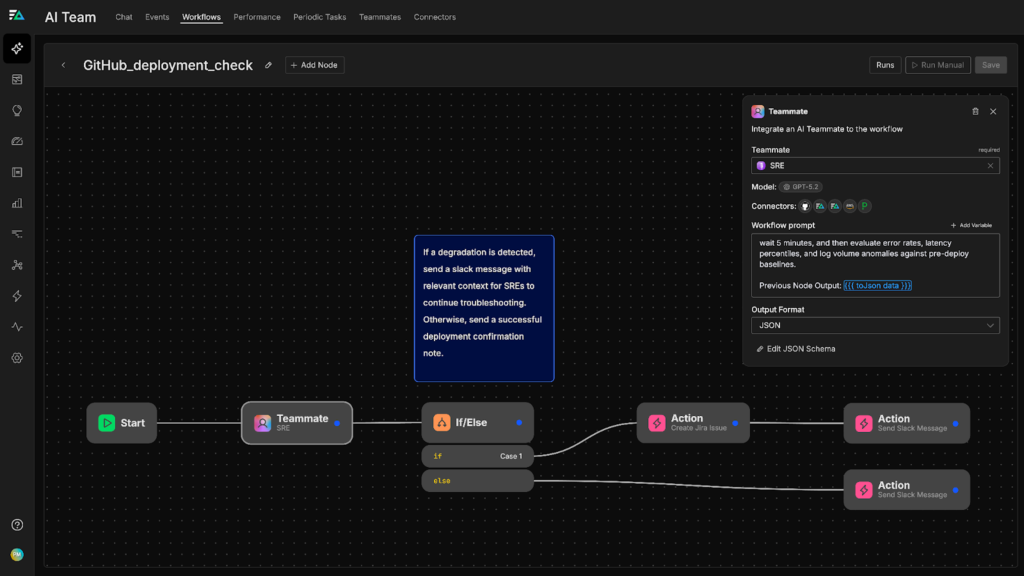
An AI Teammate node waits five minutes before evaluating error rates, latency percentiles, and log volume anomalies against pre-deploy baselines. It returns a structured output containing the deployment health status, metric deltas, and any anomaly findings. An if/else node then evaluates whether degradation was detected. If it was, a Jira ticket is created for rollback evaluation, the deployer is notified in Slack with the specific metrics in question, and the service owner is added to the thread. If the deployment looks healthy, the deployment thread is simply updated with “Verified: no anomalies detected post-deploy.”
Scheduled Operational Health Check
Every weekday at 9:00 AM, a cron job triggers this operational health check Workflow:
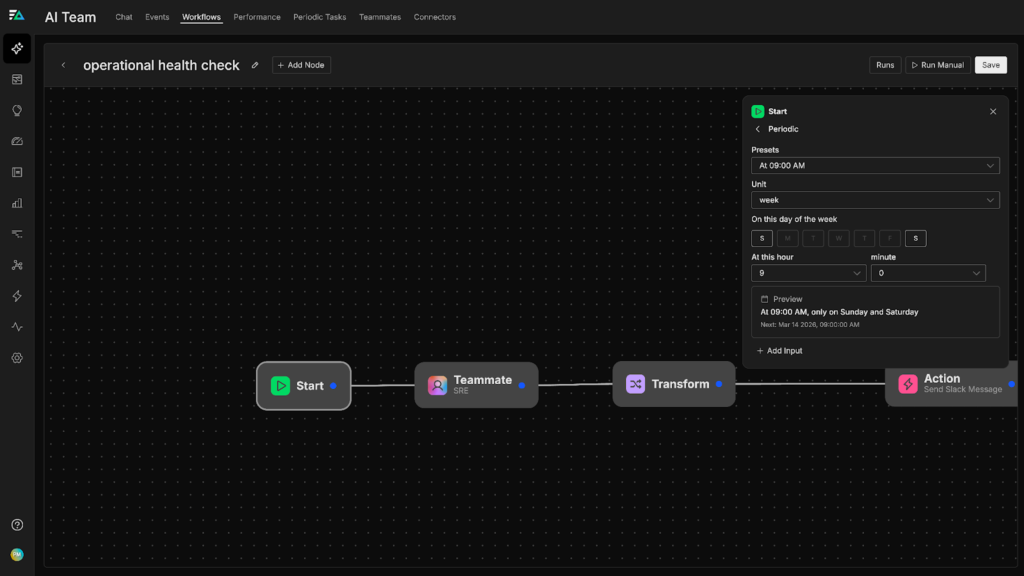
An AI Teammate node first reviews overnight monitor activity and checks for unresolved alerts, then queries resource utilization trends across key services. From there, a transform node aggregates the findings into a structured daily report, covering open issues, trending risks, and service health scores, which is posted to #ops-daily in Slack.
Why This Architecture Matters
Edge Delta’s Workflows are fully controllable and traceable, giving you complete visibility into what information persists through each step, along with key metrics to track performance and cost.
Per-node logs, step-level metadata, token usage, and duration metrics provide a complete audit trail, showing exactly what happened, what the Teammate found, what condition was evaluated, and what action was taken.
Additionally, handlebars templating lets you reference any upstream node’s output in any downstream configuration. For example, pulling {{nodes.investigate.root_cause_hypothesis}} directly into your Slack message template surfaces the Teammate’s structured root cause hypothesis findings exactly where your team needs them.
Get Started
Most automation tools force a choice between intelligent analysis and deterministic execution. Systems designed for deep investigation can reason through complex signals, while traditional automation focuses on executing predefined actions without contextual understanding. Edge Delta Workflows bring these two capabilities together by integrating AI Teammates’ non-deterministic investigation capabilities into deterministic operational processes, ensuring reliable, repeatable incident response from end to end.
If you’re a current Edge Delta user, head to the Workflows page to get started. Your existing AI Teammates, connected tools, and production data are ready to wire in. If you’re new to Edge Delta, sign up for a free trial to see how Workflows and AI Teammates can transform incident response.