

Choosing the right cloud service model will make or break your company’s ability to save money and maximize critical resources. Most organizations continue to be challenged with making this choice — research shows that 28% of organizations use Platform-as-a-Service (PaaS) in production, while 51% are still planning deployment. This gap reflects uncertainty about when to use Infrastructure-as-a-Service (IaaS), PaaS, or Software-as-a-Service (SaaS), affecting costs, productivity, and time to market.
This guide is built to remove that confusion. You will find clear explanations of cloud service types, real-world IaaS, PaaS, and SaaS examples, and simple frameworks designed for business leaders and IT managers.
By the end of this post, you will understand when to choose IaaS, PaaS, or SaaS. More importantly, you will know how to align each choice with your business goals.
Key Takeaways
• IaaS, PaaS, and SaaS each serve distinct needs. IaaS offers full control, PaaS accelerates development, and SaaS delivers instant usability.
• There’s a trade-off between control and convenience. The more the provider manages, the faster you move but with less flexibility.
• Hybrid adoption often wins. Many businesses mix all three models to balance cost, scalability, and innovation.
• ROI depends on fit and planning. SaaS offers rapid returns, PaaS increases efficiency, and IaaS yields long-term cost savings if handled appropriately.
• Implement SaaS first, then move to PaaS, and include IaaS as technology requirements and capabilities increase.
Understanding Cloud Service Models – The Foundation
Cloud computing models define who manages what in your technology stack. They balance control, convenience, and cost.
Think of them as dining choices:
- IaaS (Infrastructure as a Service): Like buying groceries. You get servers, storage, and networking, then configure everything yourself.
- PaaS (Platform as a Service): Like a meal kit delivery. The provider supplies prepared ingredients and recipes. You still cook, but with less effort.
- SaaS (Software as a Service): Like dining out. The provider delivers a ready-made solution, fully managed and easy to consume.
The more the provider handles, the faster you innovate — but you trade away some control.
The Shared Responsibility Concept
The shared responsibility model defines how ownership changes as you move across service levels:
- IaaS: Provider manages physical infrastructure. You handle OS, apps, and data.
- PaaS: Provider covers infrastructure and runtime. You focus on code and data.
- SaaS: Provider manages nearly everything. You oversee only access, settings, and data.
In a nutshell — more provider responsibility brings convenience; more customer responsibility brings control.
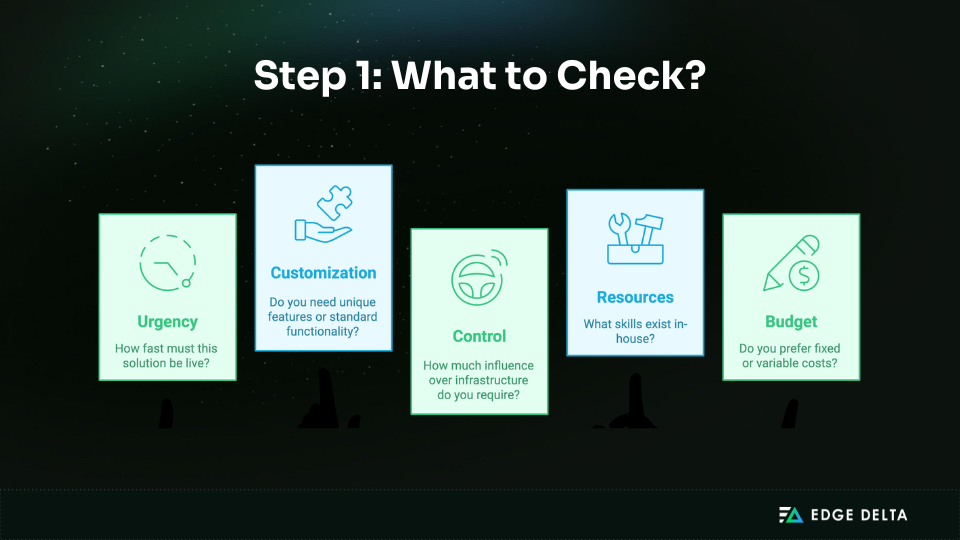
Before making a choice, companies need to look into their own IT abilities and evaluate if they lack significant in-house know-how. If so, PaaS or SaaS can lighten the load. But if customization and control are top priorities, IaaS is the way to go.
Business Impact Framework
Each model affects performance and cost differently:
- Development speed: PaaS accelerates coding; SaaS provides instant productivity.
- Cost structure: IaaS is usage-based; PaaS and SaaS replace capital expense with predictable subscriptions.
- Control: IaaS = maximum flexibility; SaaS = limited customization.
- Maintenance: IaaS needs skilled IT staff; SaaS minimizes in-house tasks.
- Scalability: All scale, but SaaS and PaaS expand instantly.
Adoption rates:
- SaaS: 87% enterprise adoption (highest growth)
- IaS: 73% (mature and reliable)
- PaaS: 56% (fastest growth rate)
Key takeaway: Choose IaaS for maximum control, PaaS for development speed, and SaaS for immediate productivity. Most businesses use all three strategically.
IaaS (Infrastructure as a Service) – Maximum Control
IaaS delivers virtualized servers, storage, and networking online. You manage OS, middleware, apps, data, and security. It suits custom setups, compliance-heavy workloads, and dynamic scaling but requires strong IT expertise.
In the US, the IaaS market is projected to grow 20.9% annually from 2024–2030. Before diving into costs and use cases, it’s important to understand who manages what under IaaS.
IaaS Responsibility Model
| Provider Manages | You Manage |
|---|---|
| Physical hardware | Operating systems & middleware |
| Data centers | Applications & data |
| Networking infrastructure | Security configurations |
| Hypervisor | Runtime environments |
IaaS also shifts expenses from capital investments to operational spending.
IaaS Cost Structure
| Business Size | Monthly Cost | Use Case | Savings vs On-Premises |
|---|---|---|---|
| Startup (10 employees) | $500–$2K | Development, testing | 60–80% |
| Mid-size (500 employees) | $5K–$25K | Web apps, databases | 40–60% |
| Enterprise (5000+) | $50K–$200K+ | Complex apps, data centers | 20–40% |
IaaS Use Cases and Benefits
IaaS is best for flexibility and control. Common uses include development and testing, hosting web apps and databases, big data processing, disaster recovery, and scaling unpredictable workloads.
Key benefits, illustrated by real-world success:
- Scalability: Airbnb handled 300% traffic increases with AWS auto-scaling without interruption or wasted resources.
- Cost-effectiveness: Dropbox lowered infrastructure costs by 50% by transferring storage and compute to AWS while serving 700M+.
- Global accessibility: Netflix streams 1B+ hours per month to 200M+ subscribers, using AWS locations for 99.99% availability.
These are just a few examples of how IaaS enables companies to be scalable, efficient, and reliable in excess of the economic constraints of on-premises infrastructure.
Implementation and Management
While IaaS provides unmatched control, it requires expertise and planning. Deployment often takes 2–6 months, depending on workload complexity.
Considerations: Teams need strong system, networking, and security skills. You handle patching, monitoring, and cost control, while the provider manages hardware security.
When to choose IaaS:
- If you need custom configurations or have legacy systems to migrate.
- If compliance demands full control over data and security.
- If workloads are highly variable and need elastic scaling.
Top providers: AWS, Microsoft Azure, Google Cloud, and IBM Cloud.
Key takeaway: Choose IaaS when you need maximum control and customization and have the skills to manage infrastructure. It is best for custom apps, compliance-heavy projects, and unpredictable workloads.
PaaS (Platform as a Service) – Faster Development
PaaS offers a complete cloud environment for application development and deployment. It reduces infrastructure management so teams can focus on building features rather than configuring servers or hardware.
The US PaaS market reached about $17.03 billion in 2023, showing its strong role in business technology spend. Before looking at speed and cost, it helps to see how responsibilities are divided between provider and customer.
PaaS Responsibility Model
| Provider Manages | You Manage |
|---|---|
| Infrastructure | Applications |
| Operating systems | Data |
| Runtime & middleware | User access & configurations |
| Development tools | Custom code & integrations |
To understand the impact, the table below shows how PaaS reduces development time and costs across common use cases.
Development Speed and Cost Impact
PaaS can reduce setup time by 40–60% compared to traditional infrastructure.
| Development Type | Traditional Setup | PaaS Setup | Savings | Best Use Case |
|---|---|---|---|---|
| Web Application | 4–8 weeks | 1–2 weeks | 30–50% | Heroku, Azure App Service |
| Mobile Backend | 6–12 weeks | 2–4 weeks | 40–60% | Firebase, AWS Amplify |
| Data Analytics | 8–16 weeks | 2–6 weeks | 50–70% | Google Cloud Dataflow |
| API Development | 2–6 weeks | 1–2 weeks | 25–40% | AWS Lambda, Azure Funcs |
Enterprise Success Examples
- Spotify used Google App Engine to cut rollout time by 50%.
- Samsung relied on AWS Elastic Beanstalk for uptime during peak launches.
- ING Bank used Azure App Service to reduce time-to-market by 40%.
PaaS Development Benefits
PaaS streamlines software delivery through preconfigured environments with embedded IDEs, databases, and runtime. Developers may get started at once without having to set up for weeks.
DevOps pipelines are integrated within, enabling continuous integration and deployment with less delay and fewer errors. Reusable pipeline components can also help standardize automation across projects.
Other advantages include:
- Automatic scaling during traffic spikes.
- Database management with backups and updates handled by the provider.
- Security features such as authentication and encryption built into the platform.
- Collaboration for distributed teams using shared environments.
PaaS reduces development overhead while increasing efficiency by fusing speed, flexibility, and predictable costs.
When PaaS Makes Sense
PaaS is optimal when speed and productivity outweigh full control. Common use cases include:
- Web applications needing fast deployment.
- Mobile backends supporting millions of users.
- Rapid prototyping where ideas must be tested quickly.
- Microservices requiring modular, scalable components.
It is best for organizations that want developers focused on innovation rather than managing infrastructure.
Limitations: PaaS can lead to vendor lock-in, reduced customization, and higher costs at very large scale. For compliance-heavy industries, IaaS may be preferable.
SaaS (Software as a Service) – Immediate Productivity
SaaS delivers ready-to-use applications online. No installation needed, just log in and start working. It removes setup delays, shifts costs to predictable subscriptions, and is ideal for core business functions.
By 2023, 95% of organizations were using SaaS, making it the dominant model. Before looking at ROI, it helps to understand the responsibility split.
SaaS Responsibility Model
| Provider Manages | You Manage |
|---|---|
| Infrastructure | User access |
| Platform & application | Data & workflows |
| Security & updates | Business configurations |
ROI Analysis
SaaS typically provides 25–40% cost savings compared to traditional deployments.
| Function | Traditional Cost | SaaS Cost | Setup Time | ROI Timeline |
|---|---|---|---|---|
| Email & Collaboration | $50K–$200K + $30K/yr | $60–$120/user/yr | 1–4 weeks | 3–6 months |
| CRM System | $100K–$500K + $50K/yr | $25–$150/user/mo | 2–8 weeks | 6–12 months |
| Accounting/ERP | $200K–$1M+ + $100K/yr | $100–$300/user/mo | 4–16 weeks | 12–18 months |
| HR Management | $50K–$300K + $25K/yr | $5–$25/user/mo | 2–6 weeks | 3–9 months |
Enterprise Examples:
- Slack: Supported 12.5M+ daily users during COVID-19, driving 40% higher team productivity.
- Salesforce: Improved sales processes with automation, boosting productivity 25% and speeding deal closure 30%.
- Zoom: Delivered reliable video conferencing to 300M+ daily participants with 99.99% uptime.
SaaS Business Benefits
SaaS enables immediate deployment, reducing software deployment to days instead of months. Subscription fees expose fixed expenses and forbid capital expenditures. By providing compliance, security patches, and automatic upgrades, vendors lessen the burden on IT.
Other key benefits:
- Scalability: Add or remove users instantly.
- Integration: APIs and connectors streamline workflows across CRM, HR, and finance tools.
- Collaboration: Cloud-native platforms enhance real-time teamwork.
Through the convergence of speed, agility, and enterprise-grade security, SaaS enables companies to realize swift digital transformation.
Selection and Implementation
Choose SaaS based on business fit and integration with existing workflows. Assess scalability, security, and cost to avoid overruns.
Best practices include:
- Run a pilot project before full rollout.
- Provide training and onboarding to speed up adoption.
- Monitor usage and consolidate overlapping tools to prevent SaaS sprawl.
Limitations: Customization is limited, data resides with the vendor, and reliable internet is required. Despite these, SaaS offers the fastest path to ROI for standard business functions.
Key takeaway: Choose SaaS for immediate productivity and predictable costs. It is best for email, CRM, accounting, HR, and other well-established business needs.
Direct Comparison – IaaS vs PaaS vs SaaS
The choice of IaaS vs PaaS vs SaaS is ultimately a tradeoff of control, expense, and speed. Each has varied requirements, and the majority of organizations employ them jointly in a hybrid approach.
This impacts the bottom-line business. For instance, a recent study run by the Hackett Group found that cloud adopters in the industrial manufacturing space reduced time-to-market by 22–36% — an incredibly impactful margin for any organization.
Comprehensive Comparison Table
Here’s a side-by-side view of control, speed, skills, and scalability across the three models.
| Factor | IaaS – Infrastructure | PaaS – Platform | SaaS – Software | Business Impact |
|---|---|---|---|---|
| Control Level | High – Full infrastructure | Medium – App logic | Low – Configuration only | More control = more responsibility |
| Setup Time | 2–6 months | 1–4 weeks | 1–7 days | Faster setup = quicker ROI |
| Skills Required | Advanced IT expertise | Developer skills | Basic training | Skills affect team cost |
| Customization | Full flexibility | App logic/UI only | Limited configuration | Match to business needs |
| Ongoing Maintenance | High – you manage all | Shared with the provider | Low – provider managed | Maintenance time affects productivity |
| Cost Predictability | Variable, usage-based | Mixed (subscription + usage) | High – subscription | Predictability helps budgeting |
| Scalability Speed | Fast with auto-scaling | Very fast, platform managed | Instant scaling | Critical for growth |
Cost and Complexity Analysis
In addition to speed and control, complexity and cost vary greatly based on workload and business size.
| Business Size | IaaS (Infrastructure) | PaaS (Platform) | SaaS (Software) |
|---|---|---|---|
| Startup (50 employees) | $2K–$8K/month – custom apps | $1K–$5K/month – web/mobile dev | $500–$3K/month – CRM, email, accounting |
| Mid-size (500 employees) | $15K–$50K/month – complex workloads | $8K–$30K/month – modernization | $5K–$25K/month – core business tools |
| Enterprise (5000+ employees) | $100K–$500K/month – legacy/data centers | $50K–$200K/month – app modernization | $50K–$300K/month – ERP, HR, collaboration |
Complexity Overview
- IaaS: Highest customization but requires advanced IT management.
- PaaS: Reduces infrastructure burden but limits deep customization.
- SaaS: Simplest to deploy and maintain but least flexible.
To make complexity and timing concrete, here’s a quick side-by-side:
Implementation Complexity & Timeline
| Model | Time to MVP | Team Skills Burden | Ongoing Maintenance | Vendor Lock-in Risk |
|---|---|---|---|---|
| IaaS | Months (2–6) | High – infra, networking, security | High – patching, scaling, hardening | Low–Medium (portable if well-architected) |
| PaaS | Weeks (1–4) | Medium – dev + DevOps | Medium – pipelines, configs | Medium–High (platform services, runtimes) |
| SaaS | Days (1–7) | Low – admin & integrations | Low – vendor-managed | Medium (data/features/workflows) |
Decision Framework
To help assist with the selection process, we’ve created the following table which highlights how speed, control, skills, and budget align with each model:
| Factor | IaaS | PaaS | SaaS |
|---|---|---|---|
| Deployment Speed | Months (2–6) | Weeks (1–4) | Days (1–7) |
| Control | Full infrastructure | App-level control | Limited configuration |
| Skills Needed | Advanced IT | Developers | Business users |
| Budget Structure | Variable, usage-based | Mixed (subscription + usage) | Predictable subscription |
| Best Fit | Custom/legacy workloads | Web apps, APIs, microservices | CRM, HR, email, productivity tools |
Who offers what in each model? Use this quick map as a starting point.
Popular Providers & Services by Model
| Model | Core Providers | Common Services / Examples | Best-Fit Scenarios |
|---|---|---|---|
| IaaS | AWS, Microsoft Azure, Google Cloud, IBM Cloud | VMs (EC2/VMs), VPC/VNet, Object Storage (S3/Blob), Load Balancers | Custom infra, compliance-heavy apps, lift-and-shift |
| PaaS | AWS, Azure, Google Cloud, Heroku | App Service/Elastic Beanstalk/App Engine, DBaaS (Cloud SQL, Cosmos, RDS), Serverless (Lambda/Functions) | Web/API dev, microservices, rapid prototyping |
| SaaS | Microsoft, Google, Salesforce, ServiceNow, Workday, Zoom | M365/Google Workspace, CRM, ITSM, HCM, Collaboration | Standard business functions with fast ROI |
How to Apply the Framework
- Speed: SaaS provides immediate productivity, PaaS enables faster development, and IaaS offers flexibility but takes longer.
- Control vs convenience: IaaS suits compliance-heavy or custom workloads, PaaS balances customization with simplicity, and SaaS maximizes ease of use.
- Skills and budget: IaaS requires strong IT expertise, PaaS suits developer-driven teams, and SaaS is best for predictable costs and minimal IT needs.
Real-World Implementation Examples
Most organizations blend IaaS, PaaS, and SaaS to balance scale, speed, and cost. These snapshots show how three leaders apply a hybrid model.
-
Shopify – E-commerce evolution. IaaS (AWS/GCP) for core infra, PaaS (Heroku/Docker) for merchant apps, SaaS (Slack/Salesforce/Zendesk) for ops.
- Results: $24M → $4.6B revenue; $175B+ annual sales; 99.98% peak uptime.
- Lesson: IaaS secures core, PaaS speeds features, SaaS streamlines operations.
-
Capital One – Digital banking. IaaS (AWS) for core systems, PaaS (AWS/Azure) for customer apps, SaaS (Microsoft 365/Workday) for back office.
- Results: 40% faster rollouts; $2.6B savings; 99.99% availability.
- Lesson: Hybrid balances compliance and innovation.
-
Spotify – Global streaming. IaaS (GCP/AWS) for distribution/data, PaaS (App Engine) for recommendations, SaaS (Slack/Jira/Confluence) for teams.
- Results: 70+ markets; 4B+ daily requests; 30% faster deployment.
- Lesson: IaaS for scale, PaaS for speed, SaaS for collaboration.
Enterprise Transformation Strategies
The best results come when cloud models align with business goals. SaaS drives efficiency, PaaS speeds development, and IaaS provides control for sensitive workloads.
Leading companies use them together: Shopify for secure transactions and rapid delivery, Capital One for compliance and innovation, and Spotify for scale and collaboration. Each shows how hybrid adoption builds resilience and growth.
Implementation Best Practices
Adopt cloud models in phases. Start with SaaS for quick ROI, add PaaS for custom apps, and use IaaS when control or scalability is essential. Plan integration early and build skills over time, from SaaS admin to PaaS DevOps to IaaS infrastructure.
A balanced portfolio works best: SaaS for savings, PaaS for innovation, and IaaS for strategic workloads that need flexibility and resilience.
Cost Analysis and ROI Framework
Subscription price is just one piece of the puzzle of smart financial planning. Businesses need to calculate the total cost of ownership (TCO) and extended return on investment (ROI) across different cloud models.
Hidden Costs and TCO Planning
Direct costs vary: IaaS includes infrastructure use, labor, tools, and training. PaaS is based on subscription, development tools, and integration. Licenses, training, and customization are all included in SaaS. In addition, 20–30% of expenses are often hidden costs:
- Data transfer fees: Add 10–20% to overall costs.
- Integration projects: $50K–$500K per system.
- Training: $5K–$50K per employee.
- Compliance: 15–25% premium for security and regulations.
- Vendor management: Ongoing negotiation and governance costs.
Over five years, these factors compound. A SaaS-only enterprise may spend ~$7.5M, while a hybrid mix averages ~$8.5M. Yet a balanced allocation—60% SaaS, 25% PaaS, 15% IaaS—can lower TCO to ~$7M, outperforming both single-model and on-premises IT.
ROI Optimization Strategies
ROI in the cloud comes from productivity, savings, and revenue growth:
- SaaS: 20–40% efficiency gains in 3–9 months
- PaaS: 40–60% faster development, ROI in 6–18 months
- IaaS: 30–50% lower infrastructure overhead, payback in 12–24 months
Savings stem from fewer IT staff, no capital costs, and 15–30% less operating overhead. Revenue grows through faster launches, better customer experiences, and quicker innovation.
Budget for stages:
- Year 1: 60% SaaS, 25% PaaS pilots, 15% IaaS
- Years 2–3: expand PaaS and SaaS, add IaaS for compliance
- After Year 3: reinvest in AI, analytics, and integrations
Ongoing optimization that includes right-sizing workloads, tracking usage, consolidating vendors, and negotiating pricing can reduce overall IT costs by 20 to 30 percent.
Key Takeaway: Begin with SaaS to achieve quick wins, extend to PaaS to gain development agility, and use IaaS judiciously. A well-balanced, well-crafted combination of the three maximizes ROI while keeping TCO manageable.
Simple Selection Framework and Next Steps
Choosing between IaaS, PaaS, or SaaS requires precision. When teams adopt tools reactively or commit to the wrong model, costs spiral and value is lost.
A straightforward, methodical approach lowers long-term risk, guarantees seamless execution, and assists in coordinating decision-making with real business priorities.
Selection Process
Understanding your organization’s needs is the first step in making the right choice. This methodical procedure makes it possible to eliminate costly errors and options.
Step 1: Assess Needs
Begin with a quick self-check:
Step 2: Match Models
Use your answers to align with the right service:
- SaaS: Fastest setup, ideal for collaboration, CRM, or finance tools.
- PaaS: Supports custom applications and rapid development cycles.
- IaaS: Provides maximum control for technically capable teams.
- Hybrid: Combines models when no single option covers all needs.
Be sure to avoid common pitfalls when choosing between services. Teams often deploy tools without training, skip integration planning, or choose more complex solutions (e.g., IaaS) when simpler, more streamlined solutions (e.g., SaaS) would suffice. Add inconsistent security and vendor sprawl, and costs and risk quickly rise.
Implementation Roadmap
Once the model is chosen, execution matters. This roadmap helps phase adoption, maintain control, and prove value quickly.
Step 3: Start with Quick Wins
Adopt in stages to build momentum:
- Months 1–2: Deploy SaaS tools like Microsoft 365, Google Workspace, Salesforce, or QuickBooks to gain immediate productivity.
- Months 3–6: Add PaaS platforms such as Heroku or Azure App Service for web or mobile projects.
- Months 12+: Introduce IaaS where specialized infrastructure or large-scale data processing is needed, such as AWS EC2 or Azure VMs.
Step 4: Plan Governance
Governance ensures smooth scaling:
- Apply consistent security
- Monitor costs across platforms
- Ensure integration of systems
- Invest in staff training
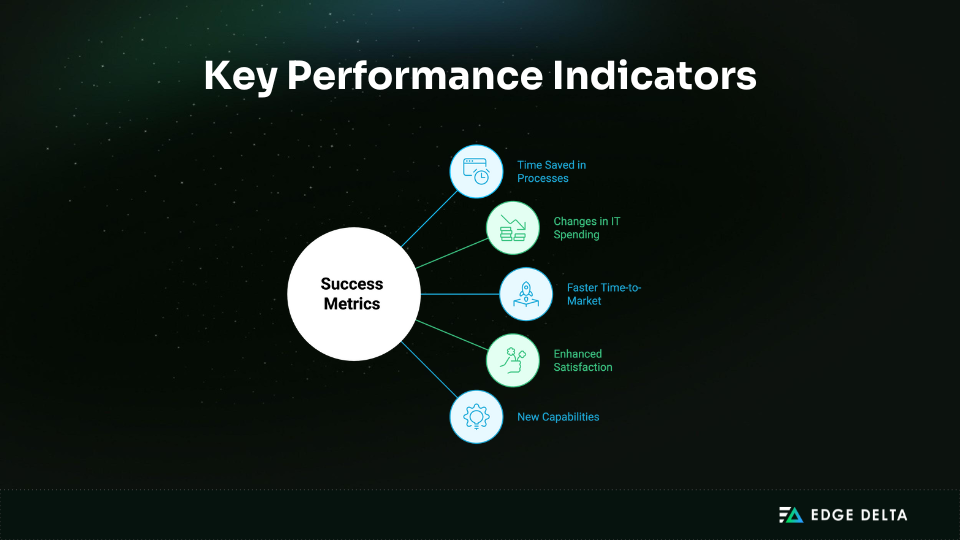
Success Metrics
Measure progress to validate the approach:
Next Steps:
Turn strategy into action:
- Complete the business needs assessment
- Select one SaaS tool for immediate impact
- Build a 12-month adoption roadmap
- Prepare a training plan for your team
Conclusion
Choosing among IaaS, PaaS, and SaaS shapes how your business operates and grows. IaaS offers flexibility, PaaS speeds development, and SaaS delivers instant usability. The best outcome is when they are combined in a hybrid solution that suits your mission and budget.
Businesses that strategically plan their mix achieve quicker time-to-market and reduced IT expenses. Begin with SaaS for immediate productivity benefits, add PaaS to enable custom applications, and introduce IaaS when control over the infrastructure or compliance is required.
With a good strategy and governance in place, cloud adoption is not only a cost decision but also an innovation and resilience driver over the long term.
Frequently Asked Questions
What’s the main difference between IaaS, PaaS, and SaaS?
IaaS offers infrastructure control, PaaS enables application development, and SaaS delivers ready-to-use software. Control decreases from IaaS to SaaS, while convenience increases.
Can I use multiple cloud service models together?
Yes. A hybrid approach is common: IaaS for infrastructure, PaaS for development, SaaS for productivity. Success requires integration planning, consistent security, and cost monitoring.
How do I choose between IaaS, PaaS, and SaaS for my business?
Choose by following the 4-step framework: assess needs, match models, start with quick wins, and plan governance. Begin with SaaS for speed, add PaaS for custom apps, and use IaaS only when maximum control is required.
What are the hidden costs in cloud service models?
Hidden costs extend beyond subscriptions. Data transfer adds 5–15%, integration and storage 10–20%, and training or skill gaps 20–30%. Compliance, security, and vendor management can further increase overall cloud spend.
What skills does my team need for each service model?
SaaS teams need basic user training and integration skills. PaaS requires developer and DevOps expertise, while IaaS demands advanced infrastructure, networking, and security skills. Training should align with each model’s responsibilities.
References