

AWS AppSync offers a simple promise: fully managed GraphQL without the need to run servers. It handles scaling, subscriptions, and offline data synchronization, helping teams reduce development time when building on AWS.
AppSync integrates seamlessly with DynamoDB, Lambda, and Cognito, though it comes with design considerations such as a 30-second timeout and a 1 MB response limit. Pricing also becomes an important factor as usage grows, particularly for apps with steady, predictable traffic.
While self-hosted GraphQL can still be a strong choice in certain scenarios, the right model depends on your workload. Understanding AppSync’s pricing, resolver behavior, and integrations helps you determine where it delivers the most value.
This guide covers core AWS AppSync features, how the service works, real-world usage patterns, limitations, and when alternatives like Apollo Server or REST APIs may be a better fit.
Key Takeaways
• AppSync provides managed GraphQL with built-in real-time updates, offline sync, and strong AWS integrations.
• It supports multiple resolver types and connects easily to DynamoDB, Lambda, Aurora, OpenSearch, and HTTP services.
• Pricing is usage-based and works well for variable traffic, but steady high-volume workloads can be more expensive than self-hosted GraphQL.
• It’s ideal for mobile apps, collaborative tools, dashboards, and event-driven workloads that benefit from subscriptions and autoscaling.
• Technical limits like the 30-second timeout, 1 MB response cap, and small batch sizes influence schema and resolver design.
• Effective monitoring depends on CloudWatch and X-Ray to track latency, resolver behavior, caching, and WebSocket connections.
• AppSync isn’t the best fit for multi-cloud portability or large federated graphs, where Apollo or self-hosted options provide more control.
Understanding AWS AppSync
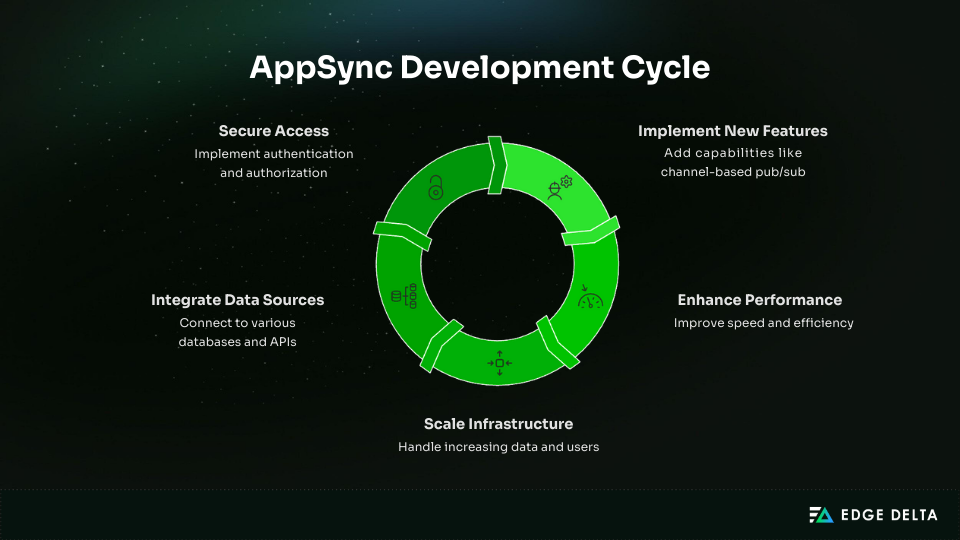
Modern applications require real-time data, offline access, and APIs that scale with growth. AWS AppSync delivers all of this through a fully managed GraphQL service that handles the backend for you.
This section explains what AppSync is, how it differs from self-hosted GraphQL, and why it’s well suited for serverless architectures.
What Is AWS AppSync?
AWS AppSync is a fully managed service for building GraphQL APIs without running or scaling your own servers. It builds on the GraphQL specification, introduced in 2012 and later open-sourced as an alternative to REST.
With GraphQL, clients request only the fields they need, all through a single strongly typed endpoint. AppSync extends this model by automatically managing availability, scaling, and operational tasks.
AppSync also handles authentication, caching, and connections to backend systems. It integrates directly with DynamoDB, Lambda, Aurora, OpenSearch, and HTTP endpoints, allowing your API to pull data from multiple sources without extra infrastructure.
Because it uses a usage-based pricing model, you only pay for what you use. For teams already building on AWS or adopting serverless architectures, AppSync enables rapid GraphQL API deployment while avoiding much of the overhead of running a custom GraphQL server.
Why AWS Built AppSync for Serverless Architectures
Running a self-hosted GraphQL server requires manual effort for:
- Scaling
- Authentication
- Caching
- Monitoring
- Integrating multiple data sources
AppSync eliminates this complexity by managing the underlying infrastructure and providing native integrations with DynamoDB, Lambda, Aurora, OpenSearch, and HTTP endpoints.
Quick GraphQL Primer
GraphQL is built around a schema that defines the types your API exposes. Clients interact with the API through three types of operations:
- Queries for reading data
- Mutations for writing data
- Subscriptions for receiving real-time updates
Each field in the schema uses a resolver, which defines how AppSync fetches or transforms the data. Resolvers can be written in VTL or JavaScript and can pull from DynamoDB, Aurora, Lambda, OpenSearch, or external HTTP services.
Core AppSync Architecture
AppSync processes each GraphQL request, executes the necessary resolvers, and returns a response shaped by the query. It manages authentication, data access, and real-time updates, allowing you to consolidate multiple backend operations through a single API.
The key components include:
- GraphQL proxy: Parses incoming requests
- Resolvers: Connect schema fields to data sources
- Data sources: DynamoDB, Aurora, Lambda, OpenSearch, and REST endpoints
- Pipeline resolvers: Support multi-step workflows
- Caching layer: Speeds up read operations
- Subscriptions engine: Manages WebSocket connections for real-time updates
AppSync Events (March 2025 Release)
AppSync has also expanded beyond traditional GraphQL features, and AWS recently introduced a separate event system that supports lightweight Pub/Sub messaging.
New capabilities include:
- Channel-based pub/sub outside GraphQL
- Publish/subscribe without defining a schema
- Optional Lambda handlers for auth and transformations
AppSync isn’t just a GraphQL host. It’s an AWS-native orchestration layer for quick development and real-time features, but it also brings trade-offs like lock-in and limited control.
How AWS AppSync Works
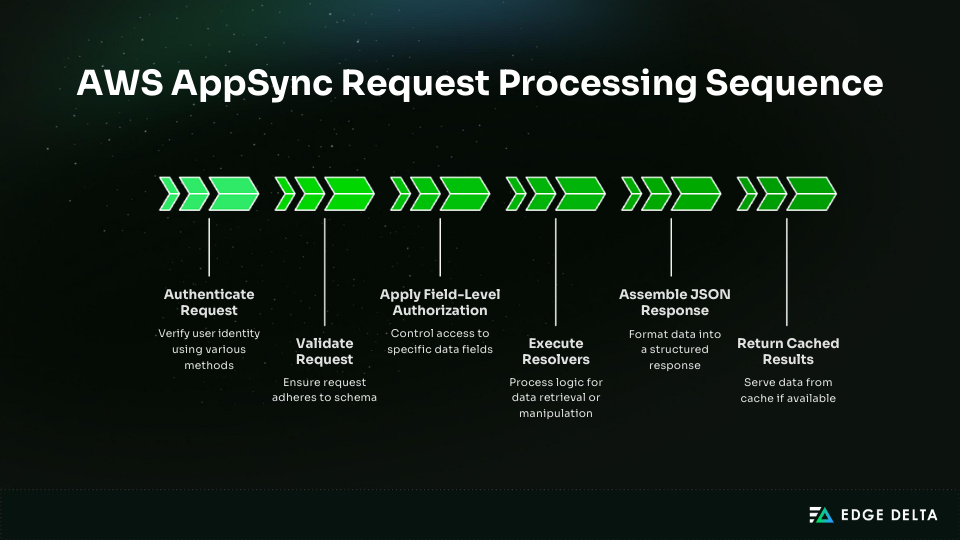
AWS AppSync handles GraphQL requests through a managed execution pipeline that simplifies data access and real-time communication. This section explains how requests flow through the system, how resolvers process logic, and how AppSync integrates with different data sources.
Request Flow Architecture
AppSync processes each query, mutation, or subscription by:
- Authenticating the request
- Validating it against the schema
- Applying field-level authorization
- Running resolvers for DynamoDB, Aurora, Lambda, OpenSearch, or HTTP endpoints
- Building a JSON response shaped by the query
- Returning a cached result when available
Pipeline resolvers let you break a request into multiple steps. A before step can set things up, followed by a series of function steps that handle validation, fetching, or transformations. After those run, an after step formats the final result before it’s returned to the client.
Resolver Types and Languages
There are a few types of resolvers, and each comes with its own strengths. The table below gives a quick look at the main options you’ll work with in AppSync.
| Resolver Type | Strengths | Drawbacks | Best Use Cases |
|---|---|---|---|
| VTL Resolvers | Fast No extra cost | Harder to write 64 KB limit | Simple CRUD Direct DynamoDB/RDS access |
| JavaScript / TypeScript Resolvers | Easy to maintain | Limited runtime | Data shaping Light logic |
| Lambda Resolvers | Full flexibility | Cold starts Higher cost | Complex logic External API calls |
Data Source Integrations
- DynamoDB – High-throughput CRUD, auto-generated resolvers, five-item batch limit.
- Lambda – Flexible for business logic or non-AWS databases.
- RDS/Aurora – Relational queries via Lambda or Data API; RDS Proxy helps scaling.
- OpenSearch – Native support for search and analytics.
- HTTP Endpoints – Connect to third-party or internal REST services.
AWS AppSync Key Features
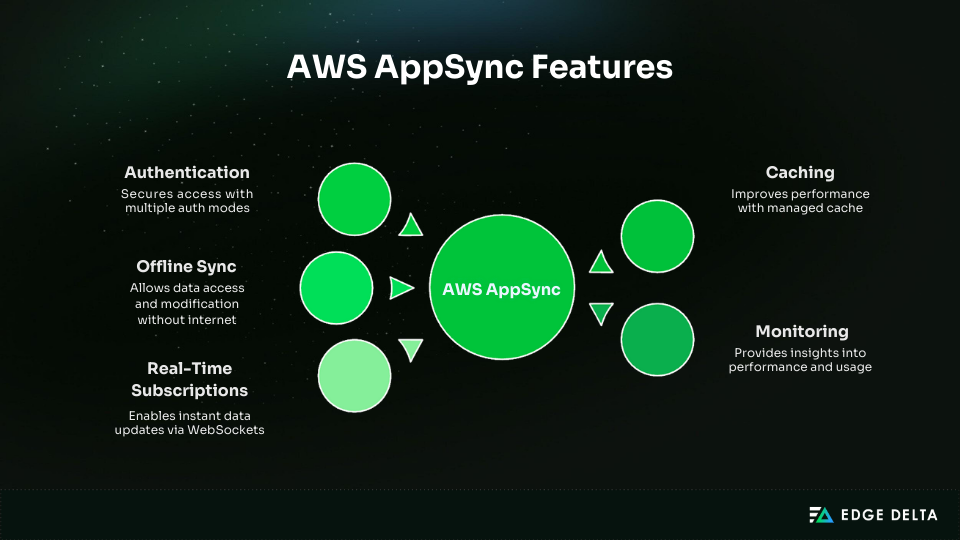
AWS AppSync is a fully managed GraphQL service that handles real-time updates, offline access, authentication, caching, and monitoring without the need to run or scale backend servers.
Unlike self-hosted GraphQL, where each capability requires separate components, AppSync delivers everything in one platform. Here are some key features that set it apart:
Real-Time Subscriptions
AppSync leverages WebSockets to deliver updates instantly whenever data changes, giving clients real-time results without the need for polling.
This approach works seamlessly for chats, dashboards, notifications, and other live features — and can handle a large number of concurrent connections. Server-side filters ensure clients receive only the updates relevant to them, and pricing is based on messages and connection time.
Subscriptions can broadcast to many users, support shared channels, or target specific fields such as room IDs. For example, Sky Italia uses this model to deliver live sports updates in milliseconds.
Offline Sync and Conflict Resolution
AppSync supports offline access through Amplify DataStore, which stores data locally, runs full GraphQL queries offline, and automatically syncs changes when the device reconnects. No special sync logic is needed. Conflicts can be resolved with auto-merge, last-writer-wins, or a simple Lambda function, while the UI updates optimistically in the background.
Authentication and Authorization
AppSync supports concurrent auth modes, including:
- API keys
- IAM
- Cognito with MFA
- OIDC providers (like Auth0 or Okta)
- custom Lambda authorizers
It enforces field-level rules through owner access, groups, and Lambda-based logic. For private workloads, the API can run inside a VPC and integrate with WAF for added protection.
Caching and Performance
AppSync offers a fully managed per-resolver cache with:
- TTLs up to an hour
- Support for 25 cache keys
- Pricing that starts around $0.04 per hour
It speeds responses, reduces DynamoDB and Lambda usage, and works well for profiles, catalogs, and metadata, but is not suitable for real-time or personalized data.
AWS AppSync Pricing Explained
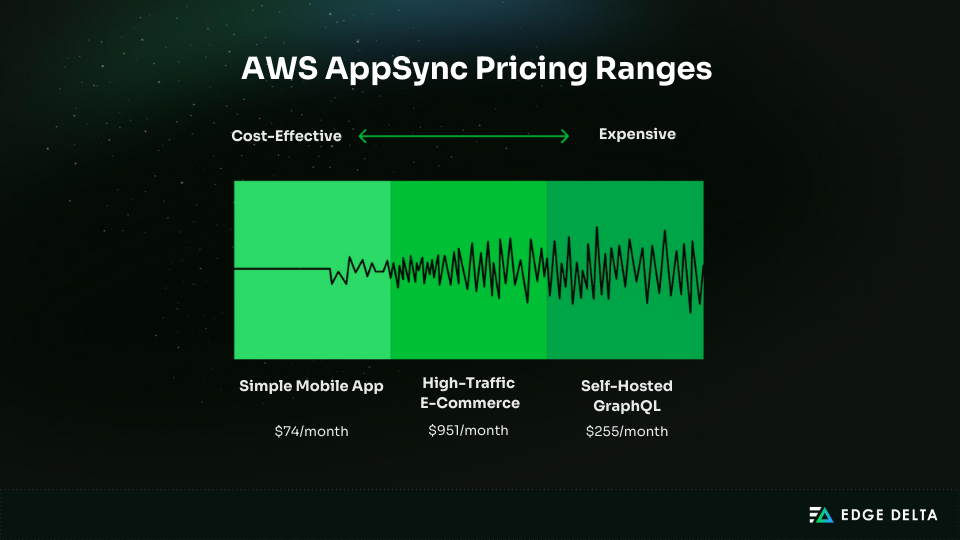
AWS AppSync pricing can seem complex since operations, messages, connections, caching, and data transfer are all billed separately. Understanding the cost of each component helps you estimate your monthly expenses and design a solution that fits your needs.
Pricing Components
AppSync’s pricing is based on how the API is used. Requests, real-time activity, network traffic, and optional features contribute to the final cost. The main components break down as follows:
- Query and Data Modification Operations: AppSync bills queries and mutations at $4 per million operations. Each query or mutation counts as one operation, and billing is measured per second. If a request fails during authentication, it isn’t charged.
- Real-Time Updates: Real-time usage is billed in two ways: messages and connection time. Messages cost $2 per million (in 5-KB chunks). WebSocket connections cost $0.08 per million connection-minutes.
- Data Transfer: Data transfer follows standard AWS networking rates. Traffic within the same Availability Zone is free. Cross-AZ transfer is charged per GB, usually around a cent. Internet egress is billed at normal AWS rates, starting around nine cents per GB.
- Optional Add-Ons: Certain features add extra cost. Caching is billed hourly, starting at about $0.04 per hour. Custom domains are free aside from the required ACM certificate.
Cost Calculations and Examples
Here are a few examples showing how the main pricing pieces add up in real workloads:
Example 1: Simple Mobile App API
- 15M operations → $60
- 4.32M connection-minutes → $3.46
- 3M messages → $6
- 50 GB outbound → $4.50
Estimated total: $74/month
Example 2: High-Traffic E-Commerce API
- 100M operations → $400
- 2.16B connection-minutes → $172.80
- 50M messages → $100
- Caching (8 instances) → $233.60
- 500 GB outbound → $45
Estimated total: $951/month
Comparison: Self-Hosted GraphQL
- ECS Fargate tasks → $120
- ALB → $20
- Redis → $40
- 500 GB outbound → $45
Estimated total: ~$255/month
AppSync simplifies scaling and real-time features, but it gets expensive beyond ~10 million requests a month. When you host your own site, it can be 50–75% cheaper at high volume.
Cost Optimization Strategies
Cost optimization focuses on cutting unnecessary operations and traffic. A few targeted adjustments can noticeably reduce monthly spend:
- Batch queries and use caching
- Reduce real-time connections and filter messages
- Minimize data transfer and keep workloads in-region
- Cache stable data and monitor hit rates
AWS AppSync Use Cases
AppSync is ideal for applications that require real-time data, offline functionality, multi-source access, or variable traffic. These scenarios highlight where it provides its strongest architectural benefits.
Ideal Use Cases
AppSync works best when you need real-time data, offline access, or integration across multiple data sources. These are the scenarios where its features provide the most value:
- Real-time collaboration: Works well for shared editors, boards, and tools that need instant updates. Subscriptions and conflict resolution handle concurrent changes smoothly.
- Mobile apps with offline needs: DataStore lets apps read and write locally and sync later, making it a good fit for field tools, healthcare apps, and note-taking.
- Live dashboards and monitoring: Ideal for streaming stocks, IoT data, or sports updates. AppSync can support very high connection counts with low-latency pushes.
- Multi-tenant SaaS: Field-level auth and isolation patterns help separate tenant data while using a single API.
- Event-driven workloads: Pairs well with Lambda and pipelines for workflows triggered by backend events. Used by teams needing quick processing.
- Gaming and bursty traffic: Auto-scaling helps absorb spikes during peak events without provisioning servers.
- Microservices aggregation: Useful as a single endpoint that unifies many backend services through pipeline resolvers.
When Not to Use AWS AppSync
AppSync can fall short in workloads that need tight control, very high volume, or broad portability. Here are some reasons why it may not be the best fit:
- High, steady traffic becomes expensive
- Long-running queries hit the 30-second limit
- Large schemas and complex joins don’t fit well
- Multi-cloud and portability needs conflict with AWS lock-in
- Federation-heavy architectures are poorly supported
AWS AppSync Challenges and Limitations
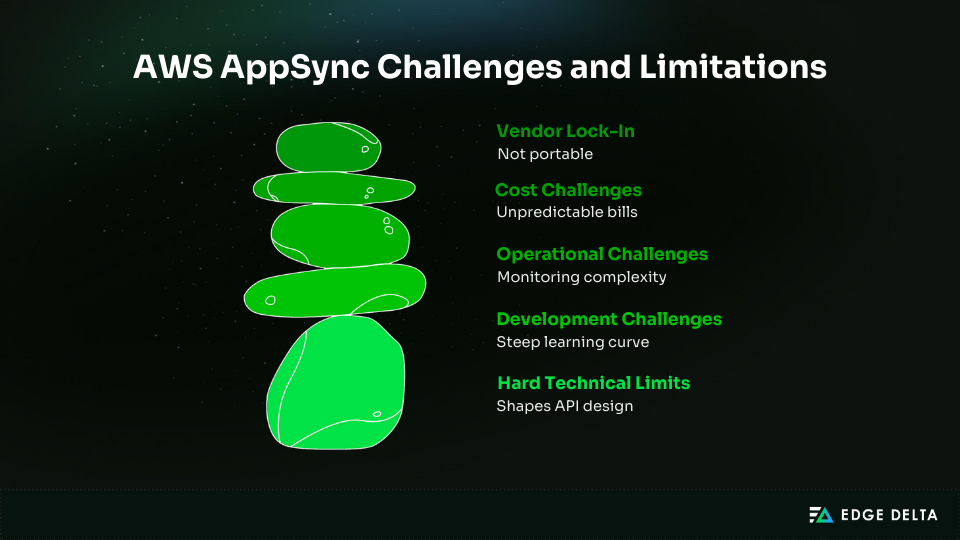
AppSync offers strong real-time and GraphQL capabilities, but it also introduces hard limits and operational constraints. Understanding these challenges helps teams avoid failed queries, unexpected costs, and redesigns.
Hard Technical Limits
AppSync enforces several limits that shape how APIs must be designed:
- 30-second resolver timeout that blocks long-running queries
- 1 MB response and schema size caps, requiring pagination and smaller APIs
- 25 APIs per region and 50 API keys per API
- 1,000 RPS default quota (increases require AWS Support)
- Batch operations limited to 5 items
Development and Operational Challenges
AppSync simplifies infrastructure but brings some friction points:
- VTL complexity
- Limited JavaScript runtime
- Lambda cold starts
- Difficult end-to-end monitoring
- No data API in v2
- Lagging IaC support
Cost and Scalability Challenges
AppSync is usually cost-effective below roughly 10 million requests a month, but costs increase dramatically at higher volume.
At around 100 million requests, AppSync often lands near $400, while an Apollo ECS setup can fall between $120 and $200. Traffic spikes can create unpredictable bills, and real-time clients continue to accrue charges even when idle.
There’s also no reserved pricing, so the only real way to lower spend is to reduce the number of operations the API receives.
Vendor Lock-In Challenges
AppSync’s strengths come from deep AWS integration, but that also makes it harder to move away. Resolver patterns, auth models, and deployment tools are tightly tied to AWS services.
Cross-cloud portability is limited, and the lack of full federation support makes migrations even more difficult. Teams should assess long-term portability early to avoid costly migrations.
Monitoring AWS AppSync Performance
Monitoring AppSync ensures stable resolvers, healthy WebSocket connections, and predictable costs.
CloudWatch, X-Ray, and structured logs provide end-to-end visibility into latency, errors, caching, and subscription behavior. Many teams complement these tools with resources that explain what effective real-time monitoring looks like in practice.
AWS-Native Monitoring Tools
AppSync relies on CloudWatch for most of its operational visibility. It provides metrics on latency, error rates, caching, and WebSocket activity, which serve as the basis for alarms and capacity planning.
Key CloudWatch metrics include:
- 4XX and 5XX errors
- p50, p90, and p99 latency
- Cache hits and misses
- Active WebSocket connections and connection errors
Teams create alarms for rising 5XX errors, slow p99 latency, low cache hit rates, and unexpected connection spikes. CloudWatch logs can capture resolver input and output, but GraphQL logs multiply and raise ingestion costs, so most teams log errors and sample the rest.
For deeper request tracing, X-Ray helps map calls across AppSync, Lambda, and DynamoDB. It highlights slow or failing resolvers and clarifies the source of latency. It doesn’t trace VTL templates, so those still rely on logs.
To analyze logs at scale, teams often turn to CloudWatch Logs Insights, which helps identify slow queries, N+1 patterns, and other heavy operations. When teams need immediate insight during high-traffic periods, real-time tail-log monitoring can surface issues before they escalate.
Performance Insights and Query Analysis
Monitoring query behavior helps catch bottlenecks early. CloudWatch Logs Insights can surface slow operations and patterns that need attention.
Issues to watch for:
- Repeated slow queries
- N+1 resolver patterns
- Deep or wide queries that add latency
Batch reads improve performance, but DynamoDB allows only five items per batch. Comparing resolver latency helps pinpoint hotspots, especially when Lambda is involved.
Caching metrics also matter. Low hit rates often signal that data should be cached longer or that queries need restructuring.
Log Management and Cost Optimization
AppSync can produce large volumes of GraphQL logs, which can drive up ingestion costs, especially in high-traffic or large-schema environments. Teams often address this by applying practical guidance on managing high-volume logs efficiently, keeping ingestion under control.
Common challenges include:
- Logs growing to tens of gigabytes per day
- High ingestion costs from verbose resolver output
- Limited value from full request/response logging
Most teams reduce volume by logging errors, sampling successful requests, or filtering logs before they reach CloudWatch. Some route logs to S3 or external pipelines to keep costs down while preserving visibility.
A telemetry pipeline like Edge Delta can help teams control AppSync log volume without losing visibility. Instead of sending every event to CloudWatch, logs can be shaped, sampled, or enriched before ingestion.
Edge Delta makes it easier to surface resolver latency trends, identify recurring errors, and track subscription behavior while keeping costs in check. Many teams route noisy, lower-value logs to archival storage and index only the logs and metrics they need for dashboards and alerts.
Best Practices for AWS AppSync
Efficient AppSync APIs depend on clear schema design, optimized resolvers, strong security, and cost-aware patterns. These practices help teams build scalable and production-ready GraphQL workloads.
Schema Design
Good schema structure keeps AppSync predictable and efficient:
- Keep the schema lean and within the 1 MB limit.
- Model types around real frontend needs.
- Use cursor-based pagination to control response size.
- Apply clear naming and reusable fields.
- Use interfaces and unions to reduce duplication.
Resolver Optimization
Good resolver choices can noticeably improve performance and reduce cost. Focus on using the right resolver type, cutting unnecessary calls, and caching data that doesn’t change often.
- Choose the right type: Pick VTL for simple DynamoDB CRUD, JavaScript for transformations, and Lambda for external APIs or complex logic.
- Reduce resolver calls: Batch reads, use pipeline resolvers to avoid N+1 issues, and keep field-level logic minimal.
- Use caching effectively: Cache expensive or high-traffic queries, set practical TTLs, and monitor hit rates to confirm the cache is helping.
- Handle errors cleanly: Keep messages clear, separate client and server errors, and log only what you need to diagnose issues.
Security Best Practices
Security in AppSync starts with picking the right auth model and enforcing clear rules at the field level. A few focused steps help prevent bad inputs and protect your data sources:
- Use the right auth mode (API Keys, Cognito, IAM, or Lambda Authorizer).
- Apply field-level rules with @auth.
- Validate inputs strictly and sanitize strings.
- Add rate limits, enforce query depth, and use AWS WAF for protection.
Cost Management
Managing cost in AppSync means reducing unnecessary operations and watching usage patterns closely.
- Monitor usage early with budgets and dashboards.
- Disconnect idle WebSocket clients and filter subscriptions.
- Compare cache cost vs DynamoDB reads.
- Use hybrid designs (AppSync for real-time workloads, REST for high-volume CRUD).
AWS AppSync vs Alternatives
AWS AppSync provides a managed GraphQL layer with real-time features and native AWS integrations. However, depending on your scale, data sources, and portability requirements, alternatives such as Apollo Server, Hasura, Prisma, or REST may be a better fit.
| Option | Strengths | Weaknesses | Best For | Not Ideal For |
|---|---|---|---|---|
| AWS AppSync | • Managed • Real-time • Offline sync • AWS-native integrations | • Costly at high volume • 30s timeout • 1MB limits • Limited federation | • AWS stacks • Real-time apps • Offline-first mobile | • High steady traffic • Multi-cloud • Large federated graphs |
| Apollo Server | • Full control • Strong federation • Any database • Cheaper at scale | • Requires DevOps • Needs pub/sub • No offline sync | • High traffic • Federated systems • Multi-cloud | • Teams avoiding server ops • Offline-first apps |
| Hasura | • Instant GraphQL for Postgres • Fast CRUD • Open-source | • Postgres-centric • Limited multi-source support | • Postgres-heavy apps • Quick CRUD APIs | • Mixed data sources • Offline-first features |
| Prisma (ORM) | • Type-safe queries • Schema modeling • Migrations | • Not an API layer • No real-time | •Apps need a strong ORM • Custom APIs | • Real-time needs • Managed GraphQL |
| REST** ****(API Gateway/ custom)** | • Simple • Predictable • Low-cost at scale • Great for binary/data-heavy uses | • No flexible queries • No subscriptions | • High-throughput CRUD • File handling | • Complex graphs • Real-time features |
A hybrid setup helps when you need real-time features alongside high-volume or cost-sensitive workloads. Teams often pair AppSync with REST or Apollo. AppSync handles subscriptions and event-driven flows, while REST or Apollo supports heavier CRUD.
Real-World AppSync Success and Failure Stories
Teams use AppSync for a range of workloads, and the results vary depending on traffic patterns, data models, and operational needs.
- HyperTrack: Used AppSync with DynamoDB to deliver high-volume location updates. Real-time features and autoscaling helped them grow without adding DevOps overhead.
- PostNL: Needed a strong federation across many services. AppSync’s limited federation support became a blocker, leading them to move to Apollo Gateway.
- Intuit: Paired AppSync with existing databases to absorb fluctuating read traffic. The shift cut costs and reduced operational work.
For steady, high-volume workloads, the picture can look different. A startup moved from ECS expecting savings, but steady traffic made AppSync roughly 2.5× more expensive than their self-hosted setup.
These examples show how AppSync performs in practice: it excels with event-driven or unpredictable workloads, but steady, high-volume systems often benefit from more control or lower-cost hosting options.
Getting Started with AWS AppSync
Getting started with AppSync is straightforward once you understand the basic workflow for creating schemas, data sources, and resolvers. The steps below walk you through building a simple yet functional API to help you learn core AppSync concepts quickly.
Prerequisites and Setup
You need an active AWS account with AppSync, DynamoDB, and CloudWatch permissions.
Create an IAM user or role and configure the AWS CLI if needed. Then, choose your approach:
- Console for learning
- Amplify for full-stack apps
- CDK or CloudFormation for production
- Terraform for multi-cloud setups
Quick Start Tutorial (Simple Blog API)
Step 1: Create API
Open AppSync → Create API → Build from scratch → name it BlogAPI → choose API Key auth.
Step 2: Define Schema
type Post { id: ID! title: String! content: String! author: String! createdAt: AWSDateTime! }
type Query { getPost(id: ID!): Post listPosts(limit: Int, nextToken: String): PostConnection }
type Mutation { createPost(title: String!, content: String!, author: String!): Post }
type Subscription { onCreatePost: Post @aws_subscribe(mutations: ["createPost"]) }type PostConnection { items: [Post] nextToken: String }
Step 3: Create DynamoDB Table
Create BlogPosts with id as the primary key.
Step 4: Create Data Source
Add a DynamoDB data source pointing to the BlogPosts table.
Step 5: Create Resolvers
getPost:
{ "version": "2017-02-28", "operation": "GetItem",
  "key": { "id": $util.dynamodb.toDynamoDBJson($ctx.args.id) } }
createPost:
{ "version": "2017-02-28", "operation": "PutItem",
  "key": { "id": $util.dynamodb.toDynamoDBJson($util.autoId()) },
  "attributeValues": {
    "title": $util.dynamodb.toDynamoDBJson($ctx.args.title),
    "content": $util.dynamodb.toDynamoDBJson($ctx.args.content),
    "author": $util.dynamodb.toDynamoDBJson($ctx.args.author),
    "createdAt": $util.dynamodb.toDynamoDBJson($util.time.nowISO8601())
  } }
Step 6: Test in Console
Run mutations, queries, and subscriptions from the Queries tab.
Next Steps After Tutorial
- Replace API Key with Cognito and apply field-level auth.
- Use
limitandnextTokenfor pagination. - Enable caching for listPosts (TTL 5–30 minutes).
- Create CloudWatch dashboards and alarms.
- Connect a frontend using Amplify or Apollo Client.
Conclusion and Recommendations
AWS AppSync is a solid choice when you want managed GraphQL with real-time features, offline sync, and tight AWS integration. It reduces operational overhead and helps teams move quickly, but costs rise with high, steady traffic.
Use it when your stack is AWS-native, your workload is unpredictable, or you need real-time or offline capability. For large, consistent volumes or strong federation needs, Apollo or other alternatives often fit better. A telemetry pipeline like Edge Delta can also help you manage high data volumes and the associated costs.
Frequently Asked Questions
Is AWS AppSync expensive compared to self-hosted GraphQL?
AppSync can become costly at high traffic because pricing scales per request. Self-hosted GraphQL is cheaper above ~100M requests per month, while AppSync stays competitive below ~10M.
Can I use AWS AppSync with Lambda functions?
Yes. Lambda resolvers work well for business logic, but they add cost at high volume. Strong Lambda log analysis helps teams understand how often these cold starts occur and how they affect resolver latency.
What is the difference between AppSync GraphQLAPIs and AppSync Events?
AppSync GraphQL manages queries, mutations, and subscriptions. AppSync Events is a WebSocket-based Pub/Sub system focused only on message delivery.
How does AppSync compare to Apollo Server for GraphQL Federation?
Apollo Server supports full federation and flexible gateways. AppSync has limited federation features and struggles with complex multi-service graphs.
Does AppSync support scaling to zero?
No. AppSync maintains infrastructure for API operations and real-time connections, though it scales automatically with request load.
References
- docs.aws.amazon.com
- aws.amazon.com
- docs.aws.amazon.com
- advancedweb.hu
- Blog.graphbolt.dev
- sls.guru
- aws.amazon.com
- blog.logrocket.com
- cloudoptimo.com
- aws.amazon.com
- Blog.graphbolt.dev
- medium.com
- docs.aws.amazon.com
- Blog.graphbolt.dev
- aws.amazon.com
- Aws-builders
- docs.aws.amazon.com
- builder.aws.com
- cloudoptimo.com