

Roughly 80% of data lake initiatives fail and devolve into data swamps where data is stored but never used. These failures waste millions on unnecessary storage, repeated reprocessing, and engineering effort. Many organizations end up with 5 PB or more of unstructured data, lacking metadata, filled with duplicate files and incompatible schemas, and driving monthly cloud bills above $115,000.
The difference between failure and success is not storage technology. Governance, partitioning, data quality, and cost controls matter far more than where data lives. When applied consistently, these best practices prevent budget waste and help data lakes deliver 3–5× ROI.
This guide outlines 10 practical data lake management tips to avoid data swamps, reduce costs, and keep data reliable and queryable. You will learn quick wins in partitioning and file formats, along with proven approaches to lifecycle management, compaction, access control, monitoring, ownership, and modern table formats.
Key Takeaways
• Partition data from day one to cut query costs by 90–99% and avoid costly rewrites later.
• Use Parquet for analytics to reduce storage by around 80% and accelerate queries by 10–100× compared to JSON.
• Apply lifecycle policies early using Intelligent-Tiering and Glacier to lower storage costs by 70–90%.
• Query costs often exceed storage costs. With Athena charging $5 per TB scanned, queries commonly cost 3–5× more than storage.
• Plan staffing by data volume, budgeting one data engineer per 50–100 TB of active data to maintain quality and control costs.
• Adopt modern table formats such as Iceberg, Hudi, or Delta Lake to enable ACID transactions, schema evolution, and reliable deletes.
***Note: ***Pricing estimates in this guide are based on publicly available AWS pricing as of 2026 and are intended for planning and comparison purposes. Actual costs may vary.
Tip 1: Implement Proper Partitioning from Day 1
Partitioning reduces the amount of data scanned and keeps query costs under control. Without partitioning, Athena scans an entire 100-terabyte table, costing roughly $500 per query. When partitioned by date, a one-day query scans about 274 GB, reducing the cost to approximately $1.37.
Effective partitioning is also foundational to AWS S3 data lake management because it determines how objects are organized and scanned at scale.
Most workloads perform best with time-based partitioning. For reporting use cases, daily partitions are typically ideal. For streaming data such as logs and events, hourly partitions work best. Multi-dimensional partitioning can help when queries frequently filter on fields like region or product type, but overuse can create an excessive number of partitions.
Common anti-patterns include:
- Overly granular layouts
- Overly coarse groupings
- Low-cardinality fields that provide little selectivity
AWS Glue supports partitioning with simple code:
df.write \
    .mode("append") \
    .partitionBy("year", "month", "day") \
    .parquet("s3://bucket/events/")
The return on investment is immediate. A 100-terabyte data lake running 1,000 queries per month can see costs drop from $500,000 to roughly $1,400 after proper partitioning, a 99.7% reduction.
Changing partitions later requires rewriting the entire dataset, which is both time-consuming and expensive. These issues are easy to avoid by choosing the right partitioning strategy from the start.
Tip 2: Choose the Right File Format (Parquet vs Avro vs JSON)
File format selection determines storage cost and query speed. Choosing the wrong format increases spending and slows every query. The right format delivers 10–100× faster performance and up to 80% less storage use.
These gains are very important for optimizing data lake storage on a large scale. JSON lets you easily take in raw data, while Parquet and ORC make big improvements to analytics. Avro is a good choice for streaming pipelines that need to change their schema.
Format Comparison
| Format | Storage vs JSON | Query Speed | Best For | Avoid For |
|---|---|---|---|---|
| Parquet | 80% smaller | 10–100× faster | Analytics | Heavy streaming writes |
| Avro | 60% smaller | 2–3× faster | Streaming ingestion | Complex analytics |
| JSON | Baseline | Slowest | Raw landing zone | Production analytics |
| ORC | 80% smaller | 10–100× faster | Hive or Spark | Athena (limited support) |
A real-world cost example shows the impact clearly. Storing a 100 GB dataset in JSON costs about $2.30 per month, and Athena must scan the entire file, costing roughly $0.49 per query. At 12,000 queries per year, the total annual cost reaches $5,882.
Converting the same data to Parquet reduces storage to about 20 GB and limits scans to roughly 2 GB per query, bringing the annual cost down to around $120. That is a savings of $5,762 per year for every 100 GB. At 100 TB, annual savings exceed $5.76 million.
These numbers illustrate why each file format belongs at a specific stage of the data lake.
When to Use Each Format:
- JSON: Raw landing zone
- Parquet: Most analytics workloads (80% of data)
- Avro: Streaming ingestion
- ORC: Hive or Spark-heavy systems
In practice, this leads to a simple, cost-aware architecture:
Raw JSON → Cleansed Parquet → Curated Parquet
Converting data to Parquet within 24 hours captures immediate query savings and prevents long-term storage and scan waste.
Tip 3: Implement Comprehensive Metadata Management
A data lake without metadata becomes invisible. Teams cannot locate datasets, pipelines break after schema changes, and engineers often duplicate data because they do not know what already exists.
Many data lakes contain thousands of S3 folders with unclear or inconsistent names, forcing engineers to spend hours searching for the correct dataset. Missing lineage information leads to broken dashboards and no impact analysis.
A metadata catalog prevents these issues by providing structure, ownership clarity, and automatic schema tracking. In both AWS and Azure Data Lake management, metadata catalogs play a central role in keeping datasets discoverable, governed, and query-ready.
Catalog Tool Comparison
| Tool | Cost | Best For | Key Feature |
|---|---|---|---|
| AWS Glue Data Catalog | $1/100K objects | AWS-native | Athena integration |
| Azure Purview | $0.006/GB metadata | Multi-cloud | Lineage + PII detection |
| Databricks Unity Catalog | Included | Databricks users | Column-level security |
| Apache Atlas | Free | Open-source users | Extensible framework |
A strong metadata catalog tracks multiple categories: schema, partitions, formats, locations, dataset descriptions, sample data, freshness, owners, SLA targets, lineage paths, transformations, quality metrics, and access patterns.
AWS Glue Crawlers can automate metadata discovery:
glue.create_crawler(
    Name='events-crawler',
    Role='AWSGlueServiceRole',
    DatabaseName='raw_data',
    Targets={'S3Targets': [{'Path': 's3://bucket/events/'}]},
    Schedule='cron(0 6 * * ? *)'
)
The crawler discovers new partitions, schema changes, and new file types. Table properties such as descriptions, ownership, PII flags, and SLA definitions add critical business context.
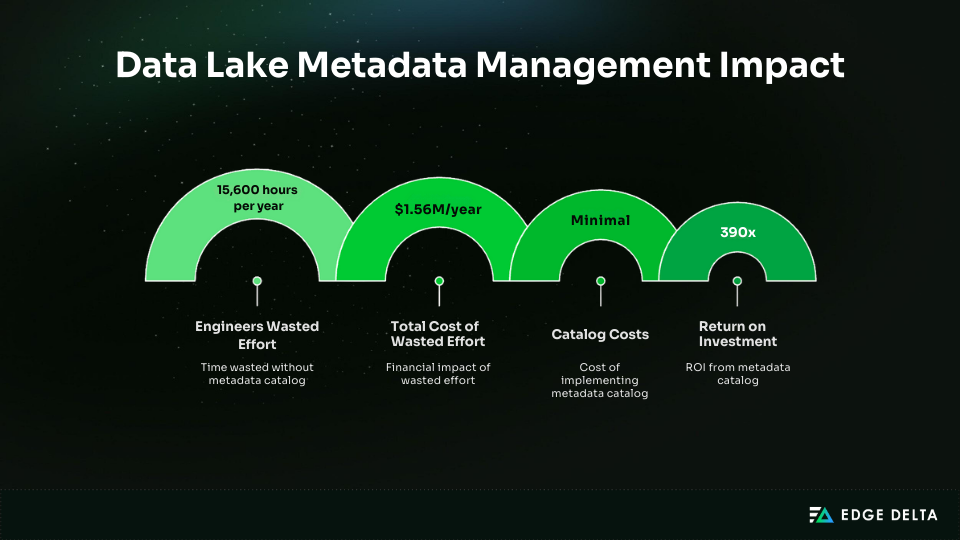
The financial impact is significant. Without a catalog, 50 engineers spending six hours per week searching for or validating data lose 15,600 hours per year. At $100 per hour, that equals $1.56 million in wasted effort annually. By comparison, catalog costs are minimal, delivering roughly 390× ROI.
Tip 4: Enforce Data Quality Checks at Ingestion
When data enters the lake, it must meet defined quality standards. Validating data only at query time leads to long-running failures and wasted engineering effort. A two-hour query can fail because a field like user_id is null, triggering hours of downstream debugging.
Poor-quality records also propagate through Raw, Cleansed, and Curated layers, compounding issues and resulting in broken dashboards and unclear ownership.
For high-volume logs and events, teams often see meaningful savings by using intelligent Telemetry Pipelines that filter or aggregate noisy data before it ever lands in object storage.
Quality Dimensions to Check
| Dimension | Check | Example | Impact If Failed |
|---|---|---|---|
| Completeness | Required fields present | user_id IS NOT NULL | Missing join keys |
| Uniqueness | No duplicates | COUNT(DISTINCT id) = COUNT(*) | Double-counting |
| Validity | Values in range | age BETWEEN 0 AND 120 | Invalid analytics |
| Consistency | Cross-field logic | order_date <= ship_date | Broken logic |
| Timeliness | Data fresh | event_time < 24h | Stale insights |
Alt tag: Data quality checks applied during data lake ingestion
AWS Glue Data Quality can run these checks automatically:
quality_rules = """
Rules = [
  RowCount > 1000,
  IsComplete "user_id",
  IsUnique "transaction_id",
  ColumnValues "age" between 0 and 120,
  ColumnValues "revenue" > 0
]
"""
Great Expectations offers an open-source alternative for structured validations and quarantining failed records.
A quarantine layer improves observability. Raw data lands first, validated data moves upstream, and failed records are stored for debugging and reprocessing. This provides an audit trail and prevents silent corruption of downstream analytics.
Preprocessing is good for streaming pipelines. For instance, Edge Delta’s pipelines filter events before they reach S3, cutting down on bad data by 60–80%.
Teams should enable ingestion-level checks on critical datasets in week one and expand to all production datasets by the end of the first month.
Tip 5: Implement Lifecycle Policies for Cost Control
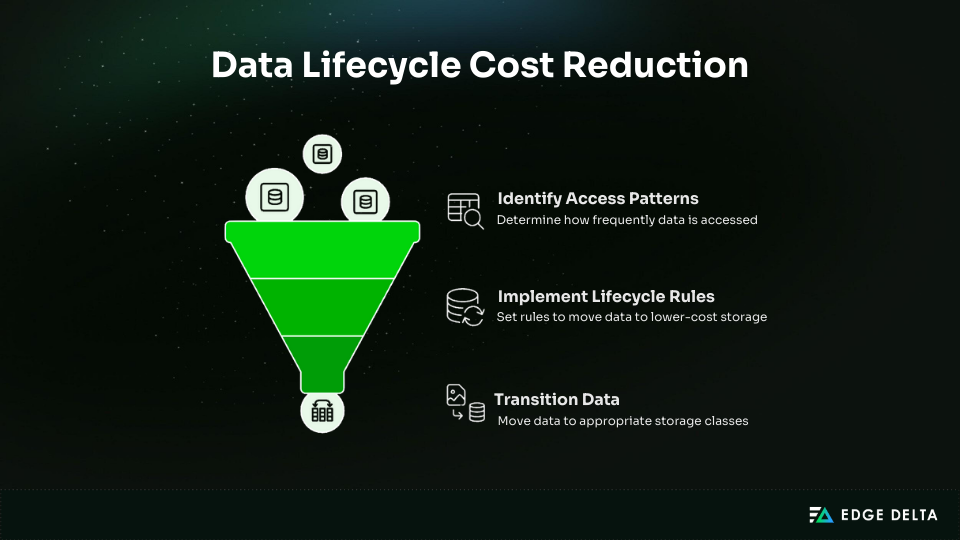
Most data in a lake is accessed once and never queried again. Lifecycle policies automatically move older data to lower-cost storage classes, reducing storage costs by 70–90% with no ongoing effort.
Without lifecycle rules, costs rise quickly. A 10 TB lake costs $230 in month one, grows to $1,840 by month six, $4,600 by month twelve, and $11,500 by month twenty-four. Much of this spend comes from cold data that remains in S3 Standard.
Access patterns show that only a small portion of data needs high-performance storage. About 10% is accessed daily in the first 30 days, 15% is accessed weekly between 30 and 90 days, 50% is accessed monthly between 90 and 365 days, and the remaining 25% is rarely accessed.
S3 Storage Class Comparison
| Storage Class | Cost/TB/Month | Retrieval Time | Use Case |
|---|---|---|---|
| S3 Standard | $23 | Instant | Hot data for 0 to 30 days |
| S3 Standard-IA | $12.50 | Instant | Warm data for 30 to 90 days |
| S3 Intelligent-Tiering | $2.30–23 | Instant | Unknown access patterns |
| S3 Glacier Flexible Retrieval | $3.60 | 1 to 5 hours | Cold data after 365 days |
| S3 Glacier Deep Archive | $1 | 12 to 48 hours | Compliance retention |
A lifecycle rule automates data transitions across storage classes. A 500 TB data lake in S3 Standard costs $11,500 per month. With lifecycle rules, this drops to $3,113 per month, saving $8,387 monthly or $100,644 annually—a 73% reduction in costs.
Configuration takes less than two hours. Intelligent-Tiering is often the best default, as it automatically adjusts storage based on usage patterns.
Tip 6: Optimize Small Files (Compaction Strategies)
Small files slow down data lake queries. One million 1 MB files can be 100× slower than one thousand 1 GB files. Streaming ingestion often creates this issue: one file per minute generates 43,200 files in 30 days, totaling just 216 GB at 5 MB per file.
Many small-file problems originate upstream, where ingestion systems lack buffering or batching, a common trade-off in scalable ingestion architectures optimized for low latency.
Query engines spend most of their time listing and opening files. An Athena query over 1,440 small files takes about 17.2 seconds to list, open, and process 7.2 GB of data.
When compacted into 48 files of 150 MB each, the same query finishes in 1.9 seconds, delivering a 9× performance improvement.
Optimal File Sizes
| Data Volume | Optimal File Size | Number of Files | Reason |
|---|---|---|---|
| <10GB | 128–256MB | 40–80 | Balanced parallelism |
| 10–100GB | 256–512MB | 200–400 | Improved parallelism |
| 100GB–1TB | 512MB–1GB | 1,000–2,000 | Reduced list overhead |
| >1TB | 1–2GB | 500–2,000/partition | Best for Spark |
Compaction can be managed with scheduled Glue jobs that merge many small files into fewer, appropriately sized ones. Apache Hudi supports automatic background compaction, and Kinesis Firehose reduces small files by buffering data until it reaches 128 MB or five minutes.
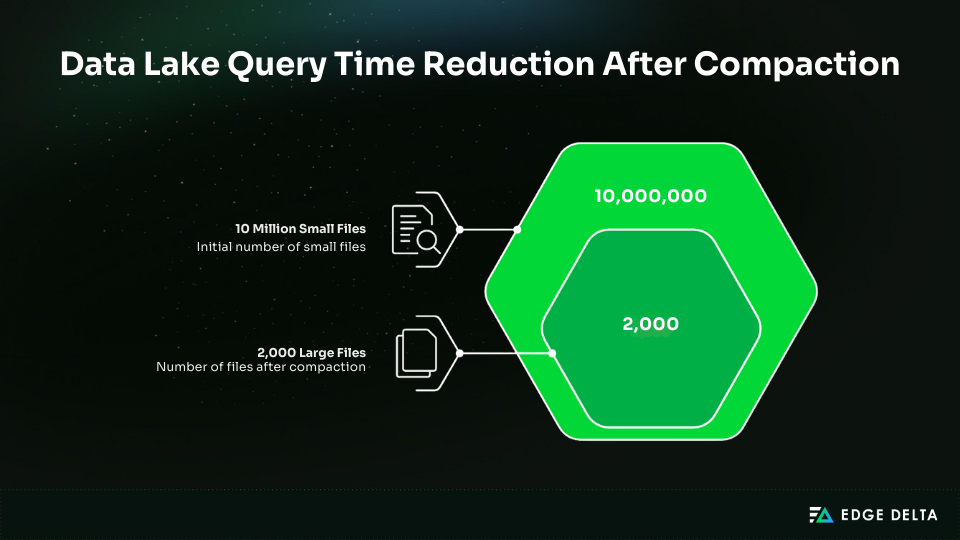
In a 100 TB data lake with 10 million small files, compaction can speed queries from several minutes to under thirty seconds. Timeout rates often drop below 1%, saving engineering teams hours of work each month.
Tip 7: Implement Proper Access Controls and Security
Data lakes store high-value information and have become frequent targets for breaches. Several incidents demonstrate how simple configuration mistakes can expose massive datasets.
In 2019, Capital One exposed 100 million customer records due to an S3 access misconfiguration. In 2016, Uber lost data for 57 million users after attackers accessed AWS credentials stored in a GitHub repository.
In 2017, Accenture exposed 137 GB of client data through a publicly accessible S3 bucket. These cases highlight why security must be built in from day one. Encryption, IAM, least privilege, and audit logging form the foundation of a secure data lake.
"ApplyServerSideEncryptionByDefault": {
  "SSEAlgorithm": "aws:kms",
  "KMSMasterKeyID": "arn:aws:kms:us-east-1:123:key/abc-123"
}
SSE S3 uses AWS-managed keys. SSE KMS offers customer-managed keys with audit trails and rotation and costs $1 per key per month plus $0.03 per 10K requests.
IAM least privilege prevents unauthorized access. Broad permissions like the ones below grant unrestricted access across all S3 resources and create unnecessary risk:
{
  "Effect": "Allow",
  "Action": "s3:*",
  "Resource": "*"
}
These should be replaced with policies that allow only the required actions on clearly defined paths:
{
"Effect": "Allow",
 "Action": ["s3:GetObject", "s3:ListBucket"],
 "Resource": "arn:aws:s3:::bucket/analytics/sales/*"
}
Lake Formation supports row-level and column-level security. Analysts can access approved regions and non-sensitive fields. Audit logging with CloudTrail tracks who accessed data, when it occurred, and from which IP.
Security Checklist
- Enable SSE KMS encryption
- Block public access
- Enforce IAM least privilege
- Enable CloudTrail data events
- Use S3 VPC endpoints
- Enable MFA delete
- Tag datasets based on sensitivity
Proper access controls reduce breach risk and provide the visibility required for safe data lake operations.
Tip 8: Monitor Costs and Usage Proactively
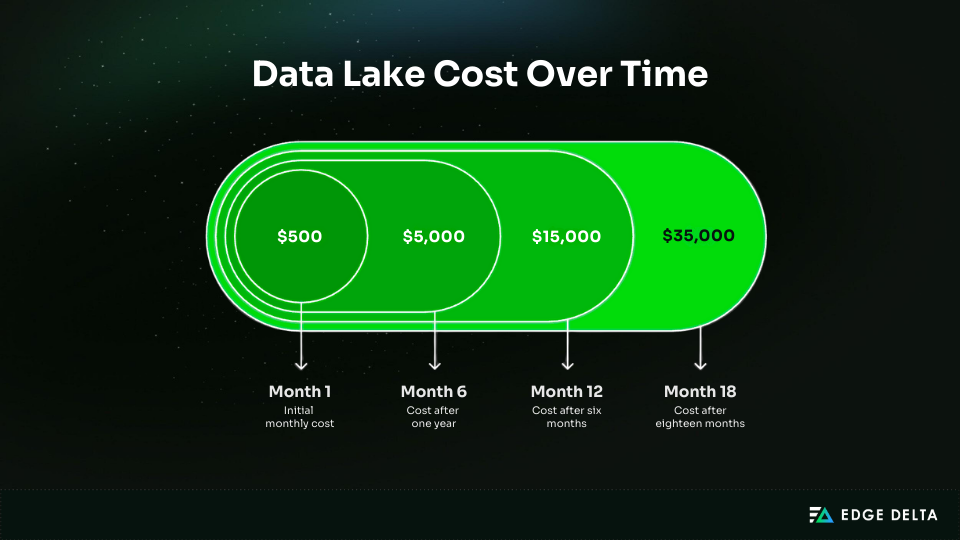
Data lake costs often rise quietly until they become difficult to manage. A typical pattern starts at $500 in month one, increases to $5,000 by month six, reaches $15,000 by month twelve, and climbs to $35,000 by month eighteen.
This section focuses on data lake cost optimization, highlighting that most savings come from reducing compute and improving partitioning.
A $35,000 monthly bill typically breaks down into three categories. Storage totals $6,830, covering 200 TB in S3 Standard, 500 TB in Intelligent-Tiering, and 300 TB in Glacier. Compute dominates at $27,324, including Athena scanning 50 TB per day, continuously running EMR clusters, and Databricks usage. Data transfer accounts for $870. With compute representing 78% of total spend, query optimization generally delivers the greatest savings.
Cost Optimization Strategies
| Strategy | Savings | Effort | Priority |
|---|---|---|---|
| Partition pruning | 90–99% query cost reduction | Low | 1 |
| Columnar formats | 80% storage and 90% query savings | Medium | 2 |
| Lifecycle policies | 70–90% storage savings | Low | 3 |
| File compaction | 50% query savings | Medium | 4 |
| Delete unused data | Varies | Medium | 5 |
Monitoring begins with cost attribution. Apply tags to buckets and resources to track costs per team or project:
aws s3api put-bucket-tagging \
 --bucket data-lake-bucket \
 --tagging 'TagSet=[{Key=Team,Value=Analytics}]'
When ingestion logic scales with producers through source-level data preparation and fleet deployment instead of only using centralized pipelines, cost visibility also gets better in high-scale setups.
Set CloudWatch alarms to detect unusual charges and alert teams before bills escalate. Query logs help identify expensive workloads:
SELECT user, query_id, data_scanned_tb,
       data_scanned_tb * 5 as cost_usd
FROM athena_query_logs
ORDER BY cost_usd DESC
LIMIT 10;
Effective monitoring and optimization can reduce a $35K monthly data lake to about $21K, a 40% reduction.
Tip 9: Establish Data Governance and Ownership
Clear ownership is essential to prevent data lakes from becoming unmaintained environments. Without a responsible team, issues go unresolved: analysts report missing data, engineers say they only ingest it, and application teams claim they just send it.
When no one addresses the problem, data quality declines. A strong governance model establishes structured processes, accountability, and long-term consistency in data lake management.
RACI Roles
| Role | Responsible | Accountable | Consulted | Informed |
|---|---|---|---|---|
| Data Producer | Generate data | Quality at source | Schema changes | Outages |
| Data Engineer | Ingest and transform | Pipeline reliability | Consumers | Schema changes |
| Data Owner | Define standards | Governance | Stakeholders | Quality issues |
| Data Consumer | Use data correctly | Report issues | Owners | Schema changes |
Example Dataset Governance
- Dataset: sales.customer_purchases
- Business Owner: VP Sales
- Technical Owner: Data Engineering
- SLA: 99.9% availability, 1 hour freshness, 0.1% error rate
Alerts let teams know when freshness drops below 99% or when completeness drops below 99%.
A formal schema change process reduces disruption. Applying governance consistently is easier when teams rely on modular telemetry pipeline tooling that standardizes validation and transformation logic across datasets and owners.
You need to give 30 days’ notice, do an impact analysis, and have a six-week dual-write period before you can get rid of old schemas.
Retention Rules
| Data Type | Retention | Tier | Reason |
|---|---|---|---|
| Clickstream | 90 days | Standard → Glacier | Debugging |
| Metrics | 2 years | Intelligent-Tiering | Analysis |
| Financial transactions | 7 years | Standard → Glacier | Legal |
| PII | Delete on request | Standard | GDPR |
| Test data | 30 days | Auto-delete | No value |
Governance metrics, like 847 of 900 datasets having owners and a quality score of 94.5%, show that it is actively being used.
Tip 10: Choose the Right Table Format (Iceberg, Hudi, Delta Lake)
Modern table formats address major limitations of traditional data lakes. They provide ACID transactions, schema evolution, time travel, and reliable deletes. These features prevent data corruption, enable historical analytics, and reduce operational overhead.
Raw Parquet has several drawbacks. It lacks ACID transactions, so concurrent writes can corrupt data. Schema evolution is limited, requiring partition rewrites for deletes or updates. It also does not support time travel, making consistent reads difficult.
Table Format Comparison
| Feature | Iceberg | Hudi | Delta Lake | Parquet |
|---|---|---|---|---|
| ACID Transactions | Supported | Supported | Supported | Not supported |
| Schema Evolution | Full support | Full support | Full support | Limited support |
| Time Travel | Supported | Supported | Supported | Not supported |
| Upserts and Deletes | Supported | Optimized support | Supported | Not supported |
| Hidden Partitioning | Supported | Partial support | Partial support | Not supported |
| Engine Support | Spark, Trino, Flink, Athena | Spark, Flink | Spark, Databricks | All |
| Best Use Case | Multi-engine analytics | Streaming and CDC | Databricks environments | Simple append-only data |
Use Iceberg if you need support across multiple engines and hidden partitioning. Choose Hudi for streaming data or frequent upserts. If you plan to use Databricks with Unity Catalog, Delta Lake is the best option. For simple append-only workloads, Parquet is sufficient.
Migration is straightforward. A Parquet table can be converted to Iceberg using a CREATE TABLE AS SELECT statement. Features like time travel, metadata-only schema evolution, and partition pruning enhance reliability and performance.
Metadata adds only 1–2% storage overhead. Query performance can improve 10–100×, and migrations typically complete in two to four weeks, often reducing costs by up to 90%.
Conclusion
Data lake success requires active management. Storage may be inexpensive, but unusable data is costly. Without governance and lifecycle controls, lakes accumulate unused data, drive up costs, and become difficult to query. Start with high-impact actions:
- Partitioning and Parquet (80–90% savings, 10–100× performance)
- Metadata catalog and quality checks (prevents data swamps)
Sustainable success depends on governance, clear ownership, and consistent maintenance. Continuous improvement matters more than perfection. Modern table formats address core limitations, but tools alone cannot replace accountability.
Aim for 10–15% improvement each quarter. Audit your data lake against these practices, identify the top three gaps, and address the highest-ROI issue first.
Frequently Asked Questions
What is the difference between a data lake and a data warehouse?
A data lake stores raw, unstructured data in object storage and uses schema on read for flexible analytics. A data warehouse stores structured data with a schema on write and delivers faster SQL performance. Data lakes cost about $23 per TB monthly, while warehouse costs are higher. Many teams use both for modern analytics.
How much does data lake storage actually cost?
S3 Standard costs about $23 per TB monthly, but the total cost depends on compute. A 500TB lake may reach about $34,500 monthly across storage, Athena scans, and EMR. Lifecycle policies can cut storage by up to 90%. Partitioning can reduce query costs by 90%. Parquet compression often lowers storage by about 80%.
Should I use Apache Iceberg, Hudi, or Delta Lake?
Iceberg splits up and looks at multiple engines. Hudi can handle upgrades that happen very often. Databricks and Unity Catalog use Delta Lake. They all support ACID transactions, schema evolution, and time travel. Parquet can handle simple read-only tasks. It normally takes 2 to 4 weeks for migrations to happen.
How do I prevent my data lake from becoming a data swamp?
Use a metadata catalog, assign dataset owners, and enforce quality checks. Apply lifecycle policies for older data and partition datasets for efficient queries. Plan for one data engineer per 50–100TB to maintain quality and governance.
What is the biggest data lake management mistake?
Lack of partitioning increases query costs by over 90% because engines scan full datasets. Storing data as JSON also increases the size by about 80%. Use early partitioning and convert to Parquet to reduce cost and improve performance immediately.
References:
- docs.aws.amazon.com
- cloudthat.com
- aws.amazon.com
- confluent.io
- docs.aws.amazon.com
- aws.amazon.com
- docs.aws.amazon.com
- docs.aws.amazon.com
- docs.aws.amazon.com
- aws.amazon.com
- docs.aws.amazon.com
- aws.amazon.com
- docs.aws.amazon.com
- docs.aws.amazon.com
- docs.aws.amazon.com
- iceberg.apache.org
- hudi.apache.org
- docs.delta.io
- aws.amazon.com
- docs.aws.amazon.com